The 6 Best Symptom Tracker Apps in 2026
Health

Key Findings
Tracker apps organize your symptoms, medications, and daily habits into a single, reliable timeline. Consistently tracking these details reveals patterns and triggers, leading to more productive, data-driven conversations with your care team.
Why you Should Care?
A good symptom tracking app can make living with illness or injury easier or facilitate a smoother recovery.
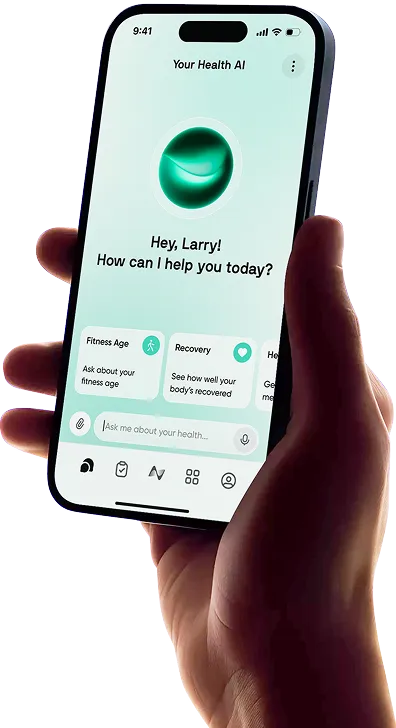
Tracking symptoms can make it much easier to understand patterns in your health, whether you are managing fatigue, headaches, digestion, pain, mood changes, sleep issues, or recurring flare-ups.
The right app can help you log what you feel, spot possible triggers, and share clearer information with a healthcare professional when needed.
In this guide, we’ll compare the best symptom tracker app options in 2026, looking at tools that help you track symptoms, habits, medications, lifestyle factors, and wider health data in a more organized way.
What is a Symptom Tracker App?

A symptom tracker app is a tool that helps you record how you feel over time, including symptoms like pain, fatigue, headaches, digestive issues, mood changes, sleep problems, flare-ups, or medication side effects.
Instead of relying on memory, you can log what happened, when it happened, how severe it felt, and what else may have been going on that day.
Many symptom tracker apps also let you record related factors such as diet, stress, sleep, exercise, medications, menstrual cycle, hydration, and daily habits. This makes it easier to spot patterns, such as symptoms appearing after certain foods, poor sleep, intense workouts, or stressful periods.
A good health condition tracking app can be especially useful if you are managing a chronic condition, preparing for a doctor’s appointment, or trying to understand recurring symptoms more clearly. It does not replace medical advice, but it can give you a more organized picture of your health and help you have better conversations with your healthcare provider.
How to Choose the Right App for Symptom Tracking?
The right symptom tracker app should make it easier to understand your health, not add another complicated task to your day. The best choice depends on what you want to track, how much detail you need, and whether you want a simple logbook or a more connected view of your overall wellbeing.
Look for Easy Daily Logging
A symptom tracker only works if you actually use it. Choose an app that makes it quick to record symptoms, severity, timing, notes, and possible triggers without too many steps. If logging feels tedious, it will be harder to stay consistent.
Track More Than Symptoms Alone
Symptoms rarely happen in isolation. A good app should let you track related factors like sleep, stress, food, exercise, medications, supplements, hydration, menstrual cycle, mood, and daily habits. This extra context can help you spot patterns that would be easy to miss from symptoms alone.
Choose an App That Helps You See Patterns
The best symptom tracking apps do more than store entries. They help you understand trends over time, such as whether headaches appear after poor sleep, digestive issues follow certain meals, or fatigue increases during high-stress periods.
Check Export and Sharing Options
If you plan to discuss your symptoms with a doctor, look for an app that lets you export summaries, charts, or reports. Clear records can make appointments more productive and help you explain what has been happening without relying on memory.
Consider Privacy and Data Control
Symptom data can be sensitive, so it is important to understand how an app stores, protects, and uses your information. Look for clear privacy settings, permission controls, and transparent data policies before adding personal health details.
Think About Whole-Health Context
If you want a fuller picture, choose an app that can connect symptom tracking with your wider health data. Platforms like Neura can help bring together symptoms, sleep, fitness, stress, nutrition, supplements, medications, wearables, and daily habits, making it easier to understand how different parts of your health may be connected.


The Best Symptom Tracker Apps of 2026

Finding the best symptom tracker app depends on what you want to understand. Some apps are best for quick daily logging, while others are better for chronic illness tracking, medication management, food triggers, wearable data, or whole-health insights. The right choice should make your symptoms easier to understand, not just easier to record.
1. Neura
Best For: Users who want symptom tracking connected with wider health data.
Neura is more than a basic symptom tracking app. It is designed to help users understand symptoms in the context of their broader health, including sleep, stress, fitness, recovery, nutrition, supplements, medications, habits, and wearable data.
This makes Neura especially useful if you want to understand why symptoms may be changing, rather than simply recording that they happened. For example, fatigue may be linked to poor sleep, high stress, under-recovery, nutrition changes, or medication timing. Neura helps connect those signals into a more complete picture.
Key Features:
AI health coach for personalized insights
Symptom, habit, supplement, and medication tracking
Connects symptoms with sleep, stress, activity, and recovery
2. Bearable
Best For: Custom symptom tracking and health pattern discovery.
Bearable is one of the strongest general-purpose symptom tracker apps because it is highly customizable. Users can track symptoms, mood, energy, sleep, medication, habits, meals, and other lifestyle factors in one place.
It is a good option for people managing recurring symptoms, mental health changes, fatigue, migraines, IBS, chronic pain, or other ongoing health patterns. Its biggest strength is flexibility, making it useful for people whose symptoms do not fit neatly into one category.
For more, be sure to check out our full, hands-on Bearable Review here.
Key Features:
Custom symptom tracking
Mood, energy, sleep, and habit logging
Medication and treatment tracking
Graphs and reports for spotting correlations
Free tracking features available
3. Guava
Best For: Keeping health records, symptoms, and medications in one place.
Guava is a personal health app designed to centralize your health information. It can help users track symptoms, medications, records, appointments, and health trends, making it useful for people who want a more organized view of their medical history and day-to-day health.
Compared with simpler symptom journals, Guava feels more like a personal health hub. It is especially helpful if you want symptom tracking alongside lab results, care notes, medication reminders, and broader health records.
Key Features:
Symptom and medication tracking
Health records in one place
Trend tracking and health summaries
Medication reminders
Appointment and care organization
4. CareClinic
Best For: Medication, treatment, and chronic condition tracking.
CareClinic is a strong option for users who want to track symptoms alongside medications, treatments, mood, pain, and daily health routines. It is often used as a chronic illness symptom tracker app, making it useful for people managing long-term or recurring conditions.
The app is helpful if you want to monitor how symptoms change over time and how they may relate to medications, treatments, or lifestyle habits. This can make doctor visits more productive because you have a clearer record of what has been happening.
Key Features:
Symptom, medication, and mood tracking
Treatment and care plan logging
Pain and severity tracking
Reports for sharing health information
Reminders for medications and routines
5. mySymptoms
Best For: Food, digestion, and symptom trigger tracking.
mySymptoms is especially useful if you suspect your symptoms are linked to food, digestion, stress, exercise, medication, or environmental factors. It lets users log meals, drinks, symptoms, bowel movements, energy, sleep, and other health details.
This makes it a good fit for users managing digestive symptoms, IBS-style patterns, food sensitivities, bloating, headaches, fatigue, or recurring reactions. If your main goal is identifying possible food-related triggers, mySymptoms is one of the more focused options.
Key Features:
Food and symptom diary
Symptom intensity and duration logging
Medication, stress, exercise, and sleep tracking
Bowel movement and digestive health tracking
Correlation analysis for possible triggers
6. Flaredown
Best For: Free chronic illness tracking and flare-up patterns.
Flaredown is a free symptom tracking platform built for people managing chronic illness, flare-ups, treatments, and triggers. It lets users track conditions, symptoms, treatments, food, and lifestyle factors, then review trends over time.
Because it is designed around chronic illness, Flaredown is a strong candidate for the best free symptom tracker app if you need something focused on long-term patterns rather than occasional symptom logging. It is especially useful for tracking how flare-ups, treatments, and triggers interact over time.
Key Features:
Free symptom and chronic illness tracking
Condition, treatment, and trigger logging
Food and lifestyle tracking
Daily check-ins
Visual health history
Track Your Symptoms Holistically with Neura Health

Symptoms rarely appear in isolation. Fatigue, headaches, digestive discomfort, poor sleep, pain, mood changes, or flare-ups can all be influenced by a wider mix of factors, including stress, nutrition, activity, recovery, medications, supplements, sleep quality, and daily habits.
Neura Health helps you track symptoms as part of your broader health picture. Instead of simply logging how you feel, Neura helps connect symptoms with the data and routines that may be shaping them.
This holistic approach makes symptom tracking more useful. You can view your symptoms alongside wearable data, health metrics, habits, and personal goals, making it easier to spot patterns that may otherwise go unnoticed.
Neura also helps turn those patterns into clearer, more personalized next steps. Whether you want to improve energy, understand recurring symptoms, manage lifestyle triggers, or prepare better notes for a healthcare professional, Neura gives you a more organized way to understand what is happening in your body.
The goal is not just to track symptoms. It is to understand them in context, so you can make better decisions about your health over time.
Final Thoughts: The Best Symptom Tracker App
At the end of the day, the best tool is the one that fits into your life without feeling like an extra job.
It does not matter how many fancy features a tool has if you do not use it on the days you are feeling rough. The value is not in the charts or the design. It is in the consistency of the data you collect.
When you keep a regular record, you are creating a clear map of your own body that you can hand to a doctor, which takes the pressure off you during your limited time with them.
This is how you move from being a passive observer of your health to an active participant.
Start by choosing the tool that seems the easiest for you to maintain, and try it out for a few weeks. You will likely find that having a clear, organized history helps you feel more in control, and that peace of mind is worth the effort.
Article FAQ
How to use a symptom tracker for chronic pain?
Start by logging your pain intensity at the same time each day to build a reliable habit. Be sure to note other variables like your sleep, diet, stress levels, and weather changes. These extra details often reveal hidden triggers, providing your doctor with clear evidence of what influences your pain levels.
What is the best symptom tracking app?
There is no single "best" tool, as it depends entirely on your personal goals. The most effective choice is the one you will actually use every day. If you want deep insights, options like Bearable are excellent. If you prefer a fast, simple experience, Symple might be the right fit.
How to choose the right symptom tracking app?
Pick a tool with an interface you enjoy using, as consistency is key. Check the privacy policy to ensure the developer does not sell your information to third parties. Look for features that align with your needs, such as medication reminders or the ability to sync with wearables you already use.
Can symptom tracking apps help with doctor visits?
Yes. These tools turn vague memories into concrete history. Instead of struggling to recall your symptoms, you can show your doctor clear charts of your health over time. This makes your appointments much more efficient, allowing you to spend time finding solutions rather than describing the past.
Are symptom tracking apps safe to use?
Many are secure, but it is vital to check the privacy policy first. Look for developers who explicitly state they do not sell user data. Before you start logging sensitive medical details, verify that the tool uses encryption to keep your records private and secure.
Do I need a paid subscription for symptom tracking?
Not necessarily. Many effective tools offer free versions that handle basic logging and history quite well. Paid versions often unlock deeper analytics or more customization options, but you can usually start with a free version to see if it fits your routine before committing to a payment.