
The Best Medication Tracker and Reminder Apps in 2026
Health

Key Findings
The best medication tracker apps make it easier to follow dose schedules, record missed or completed doses, and manage refills. Medisafe is a strong choice for complex routines, Apple Health offers a convenient built-in option, and Pillo provides persistent Android reminders. Neura stands out by connecting medication use with symptoms, supplements, and wider health patterns in one place.
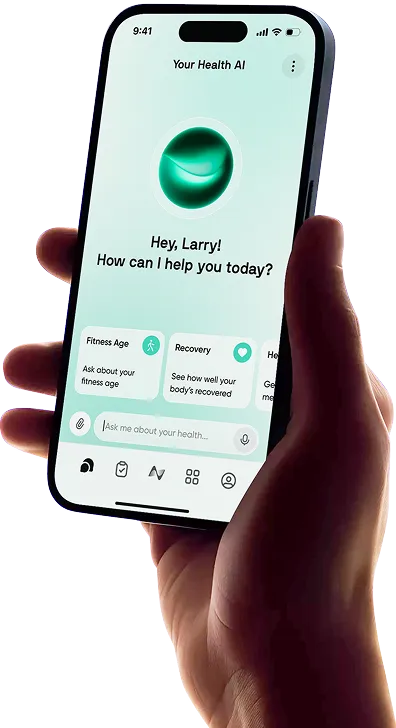
Managing medication can become difficult when prescriptions, supplements, changing doses, refill dates, and as-needed treatments are all part of the same routine.
A reliable app can make it easier to remember each dose and keep an accurate record of what you have taken.
Some apps focus on simple reminders, while others connect medication use with symptoms, health measurements, or caregiver support.
This guide compares six useful options for different needs, including Neura, Medisafe, MyTherapy, CareClinic, Apple Health, and Pillo.
Medication apps can help you stay organized, but they do not replace advice from a doctor or pharmacist. Always confirm dose changes, possible interactions, side effects, and missed-dose instructions with a qualified healthcare professional.
What is a Medication Tracking App?

A medication tracking app helps you organize medicines, supplements, doses, and schedules.
After adding a treatment, you can usually choose the amount, frequency, time, and duration. The app then sends a reminder and lets you mark the dose as taken, skipped, or delayed.
That basic log can be helpful because managing a treatment is about more than receiving an alarm.
A useful record can show whether you have been following the prescribed schedule, when a medication was started or stopped, and whether symptoms changed during the same period.
Depending on the app, you may also be able to monitor remaining pills, receive refill alerts, add appointments, record health measurements, or share a report with a clinician.
When choosing an app to track medication, consider how closely its features match your real routine. Look for scheduling options that support daily, weekly, cyclical, and as-needed treatments.
Reminders should be noticeable without becoming stressful, and logging a dose should take only a few seconds. It is also worth checking device compatibility, caregiver options, data export tools, privacy settings, and whether important features require a subscription.
The most useful tool is not necessarily the one with the longest feature list. It is the one you can set up correctly and continue using consistently.
Apps to track medication should reduce the amount of mental effort involved, not add another complicated task to your day.


The Best Medication Tracker Apps (2026)

These medication tracker apps offer useful tools for managing dose schedules, reminders, refills, symptoms, and caregiver support.
Also, for dedicated illness management beyond medication, check out our roundup of the best symptom tracker apps.
1. Medisafe
Best For: Complex routines and support from family or caregivers
Medisafe is a dedicated medication management tool available on iOS and Android. It supports multiple medicines, detailed dosing schedules, progress reports, measurements, appointments, and potential drug interaction alerts.
Its interface is centered on what needs to be taken and when, making it a practical choice for users who want a focused medication routine rather than a general wellness platform.
One of Medisafe’s most useful features is Medfriend. You can invite a family member or another trusted person who can be notified when a dose is missed.
This can provide extra support for older adults, people managing several prescriptions, or anyone recovering from an illness or procedure.
Users can also review daily, weekly, and monthly progress and share reports before a medical visit.
Key Features:
Custom reminders for complicated dosing schedules
Medfriend alerts for missed doses
Medication progress reports for appointments
Refill and potential interaction notifications
2. MyTherapy
Best For: Combining pill reminders with measurements and a health journal
MyTherapy combines medication reminders with ongoing treatment documentation. Each intake can be recorded as taken or skipped, and users can add notes to individual entries.
This creates a more complete history than a basic alarm alone, especially when treatment plans change or when you need to remember what happened on a particular day.
The app also supports symptom checks, mood entries, and measurements such as blood pressure, blood sugar, and weight.
Refill reminders help users monitor supply, while health reports can bring medication use and other tracked information together for a doctor’s appointment.
MyTherapy is a good option for someone who wants structured daily records without moving into a highly detailed health management platform.
Key Features:
Flexible alarms for medications and treatments
Automatic records of taken and skipped doses
Symptom, mood, and health measurement logging
Refill alerts and shareable treatment reports
3. Neura
Best For: Connecting medication schedules with symptoms and wider health patterns
Neura is designed for people who want more context than a standard pill alarm provides. It brings medication and supplement routines into a broader health system that can also account for symptoms, habits, sleep, recovery, activity, and other personal data.
This makes it especially useful when you want to understand not only whether you took something, but also how it may fit into the way you feel over time.
The platform’s approach is to turn health information into clear next steps rather than leaving you to study separate dashboards. Medication timing, dosage, effectiveness, and possible conflicts can be considered alongside the rest of your routine.
Neura also emphasizes proactive guidance, so useful information can come to you without requiring constant manual review.
Key Features:
Medication and supplement schedule tracking
Symptom and effectiveness monitoring over time
Conflict safety checks for newly added items
Personalized guidance based on connected health data
4. CareClinic
Best For: Chronic conditions and detailed symptom tracking
CareClinic is a broad personal health app that connects medicines with symptoms, vitals, habits, mood, nutrition, and medical records.
Its medication tools include reminders, adherence logs, and refill tracking, but its main strength is the ability to compare those records with other parts of your health.
Charts can help users review possible relationships between daily routines, treatments, and symptom changes. Reports can then be shared with healthcare professionals or caregivers.
This level of detail may be useful for people managing chronic pain, migraines, diabetes, digestive conditions, mental health symptoms, or several treatments at once.
It may feel like more than is needed for one simple prescription, but it offers flexibility for a more involved care plan.
Key Features:
Medication reminders, adherence logs, and refill tracking
Symptom, mood, vital, and lifestyle monitoring
Charts for reviewing health patterns and triggers
Reports and summaries for doctors or caregivers
5. Apple Health Medications
Best For: iPhone and Apple Watch users who want a built-in option
Apple Health includes medication tools directly within the Health app, so many iPhone users do not need to download a separate service.
You can add prescriptions, vitamins, and supplements, set schedules, receive dose reminders, and mark an item as taken or skipped. Apple Watch users can also log doses from the watch.
The feature supports specific days, times, treatment durations, and cyclical schedules on compatible software versions.
In the United States, Apple can display potential interactions between listed medications. Users can export a PDF of their current list and review how often a medicine was taken or skipped.
The main limitation is platform access, since it is built for Apple devices, and interaction information is not available in every country or for unlisted items.
Key Features:
Built-in reminders on iPhone, iPad, and Apple Watch
Taken, skipped, and as-needed dose logging
Medication list export and adherence history
Potential interaction information in supported regions
6. Pillo
Best For: Android users who need persistent alarms and refill tracking
Pillo is an Android-focused pill reminder designed to make alerts harder to overlook. Its reminders can continue until the user responds, which may help people who regularly dismiss standard notifications and forget to return to them.
The app supports daily medicines, intervals, cycles, and as-needed treatments.
Pillo also includes real-time pill counts, refill alerts, adherence reports, health measurements, interaction checks, and family profiles. Caregiver connections can send alerts after missed doses.
The app is a practical option for Android users who want stronger reminders and useful tracking tools in one place.
Key Features:
Persistent alarms for scheduled medications
Support for cycles, intervals, and as-needed doses
Pill counts, refill alerts, and adherence reports
Caregiver connections and missed-dose alerts
Neura: Track Symptoms, Conflicts, and Schedules All in One Place

A standard medication reminder tells you when to take a dose. Neura goes further by connecting medication timing with symptoms, supplements, sleep, stress, activity, and other health information.
Users can track dosage, schedules, and perceived effectiveness while building a clearer timeline of how they feel.
Neura can also flag potential conflicts when a new medication or supplement is added, giving users a reason to check with a doctor or pharmacist before combining products.
By keeping medication and wider health data in one place, Neura can help users spot useful patterns and prepare for more focused healthcare conversations.
It does not replace professional medical advice or provide approval to start, stop, or change a treatment.
Neura is best suited to people who want more context than a basic reminder provides. Those who only need simple dose alerts may prefer a lighter, more focused app.
Final Thoughts: The Best Apps for Tracking Medication
The best app depends on your treatment schedule and how much detail you want to record.
Medisafe works well for complex routines and caregiver support, while MyTherapy combines reminders with health measurements.
CareClinic is useful for detailed symptom monitoring, Apple Health provides a convenient built-in option, and Pillo offers persistent Android reminders.
Neura stands out by connecting medication use with symptoms and wider health patterns. This can make it easier to understand your routine and prepare useful information for healthcare appointments.
Whichever app you choose, check that every medicine, dose, and schedule matches the instructions from your healthcare provider. Medication apps can support consistency, but they should not replace guidance from a doctor or pharmacist.
Article FAQ
Is there an app to track medications?
Yes. Apps such as Neura, Medisafe, MyTherapy, CareClinic, Apple Health, and Pillo can help you track medications, receive dose reminders, and record whether a dose was taken or skipped. Some also include refill alerts, symptom tracking, caregiver notifications, and medication reports.
What is the best app for tracking medication?
The best option depends on your needs. Neura is useful for connecting medications with symptoms and wider health data, while Medisafe supports complex schedules and caregiver alerts. Apple Health is a convenient choice for Apple users, and Pillo offers persistent reminders for Android users.
Can medication apps remind you to take pills?
Yes. Most medication apps send notifications when a dose is due. Many allow you to create daily, weekly, cyclical, or as-needed schedules. Some apps continue sending alerts until you respond, while others can notify a trusted family member when a dose is missed.
Are medication reminder apps free?
Many medication reminder apps offer free versions with basic dose alerts and logging tools. More advanced features, such as detailed health reports, caregiver support, symptom analysis, or additional profiles, may require a paid subscription. Check the latest pricing before choosing an app.
Can I track symptoms alongside my medication?
Yes. Neura, MyTherapy, and CareClinic allow users to record symptoms alongside medication use. This can help you build a clearer timeline of when symptoms appeared or changed. However, an app cannot confirm whether a medication caused a symptom, so discuss concerns with a healthcare professional.
Are medication tracking apps safe to use?
Medication apps can be useful organizational tools when information is entered correctly. Review the app’s privacy policy, security settings, and data-sharing options before adding personal health information. Interaction alerts and app recommendations should not replace advice from a doctor or pharmacist.