The 10 Best Apps For Weight Loss in 2026: Hands-on Review
Health

Key Findings
Neura is our best overall pick for personalized daily guidance. Other top choices focus on calorie tracking, macros, behavior change, community support, or workouts. The right app is the one that makes healthy habits easier to maintain.
Weight loss apps can be useful when they make healthy choices easier to repeat. The right app should help you understand what to eat, how much to move, and what to do next without turning your day into a long tracking project.
For this review, we compared the practical experience each app offers: how much effort it takes to use, how clearly it explains your progress, whether it adapts to your needs, and which type of user it serves best.
The list includes nutrition trackers, coaching platforms, exercise apps for weight loss, and broader fitness apps for weight loss.
There is no single app that fits everyone. Searches for the best weight loss apps for women, men, beginners, athletes, or people using GLP-1 medications often lead to different answers because goals, routines, health needs, and comfort with tracking vary.
Features may also differ by subscription tier, device, and region.
Best Weight Loss Apps at a Glance
Here’s a quick look at our top picks and what each app does best.
Best Overall Weight Loss App: Neura
Best Calorie Counting App: MyFitnessPal
Best Macro Coaching App: MacroFactor
Best Detailed Nutrition Tracker: Cronometer
Best for Behavior Change: Noom
Best for Simple Food Logging: Lose It!
Best for Community Support: WeightWatchers
Best for Meal Plans: Lifesum
Best for Intermittent Fasting: YAZIO
Best Free Workout App: FitOn
Our Top Weight Loss Apps of 2026

Below, we compare each app’s strengths, key features, and the type of user it suits best.
1. Neura
Best For: Personalized Daily Weight Loss Guidance
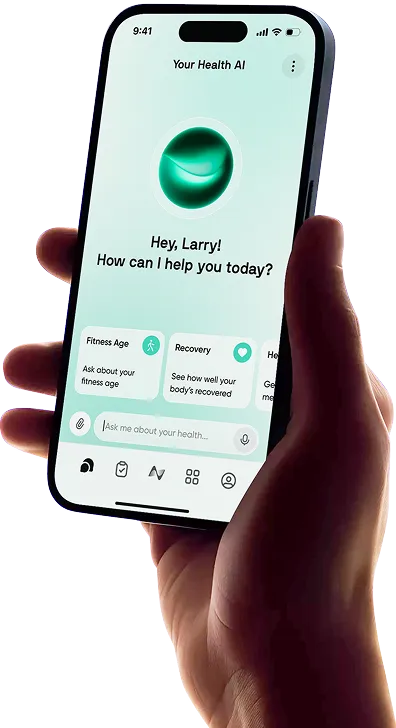
Neura is our best overall choice because it is designed to turn health data into a clear daily plan.
Instead of showing you a collection of scores and expecting you to interpret them, Neura brings together information such as sleep, stress, recent activity, recovery, and personal goals to recommend what your day should look like.
That could mean adjusting a workout, choosing a recovery walk, or changing a meal plan based on how your body is responding.
This approach makes Neura a useful AI weight loss app for people who want personalization without constant screen time.
The app is built to work quietly in the background, send proactive guidance when it matters, and adapt when your sleep, schedule, activity, or recovery changes.
It is less suited to users who enjoy manually studying every metric, but it is a strong fit for anyone who wants the app to do more of the thinking.
Key Features
Personalized daily recommendations based on connected health data
Adaptive workout, recovery, and meal guidance
Proactive notifications and personalized audio recaps
Automatic adjustments when plans or recovery needs change
2. MyFitnessPal
Best For: Calorie Counting and a Large Food Database
MyFitnessPal remains one of the most familiar food tracking options. It combines calorie, macro, water, weight, exercise, step, and fasting tracking in one place.
Its broad food database and multiple logging methods make it practical for people who eat a mix of packaged foods, restaurant meals, recipes, and home-cooked dishes.
For users comparing the best calorie counting app for weight loss, MyFitnessPal is a strong choice because it can support both simple calorie awareness and more detailed nutrition goals.
The main drawback is that some of its most convenient tools, including advanced macro settings and faster logging options, may require a paid plan. Its interface also contains more information than some beginners need.
Key Features
Calorie, macro, water, weight, exercise, and fasting tracking
Barcode, meal scan, voice, and manual food logging options
Custom calorie and macro goals on eligible plans
Device and fitness app integrations
3. MacroFactor
Best For: Adaptive Macro Coaching
MacroFactor is built for people who want precise calorie and macro targets that change with their real progress.
Its coaching system uses logged food intake and weight trends to estimate energy expenditure, then updates calorie and macronutrient recommendations during weekly check-ins.
It is our pick for the best macro tracking app for weight loss because the app focuses on adjustment rather than punishment.
MacroFactor describes its approach as adherence-neutral, which means it does not shame users for going over a target or missing a day.
The tradeoff is that it works best when food and weight data are logged consistently, so it may feel too detailed for someone who wants a lighter-touch experience.
For more, read our full MacroFactor Review here.
Key Features
Dynamic calorie and macro target adjustments
Weight trend and estimated energy expenditure tools
Weekly coaching check-ins
Goal settings for weight loss, maintenance, and muscle gain
4. Cronometer
Best For: Detailed Nutrient Tracking
Cronometer goes beyond calories and basic macros by showing a detailed view of vitamins, minerals, and other nutrients.
Its database emphasizes verified nutrition information, which can be useful for people who want to check diet quality rather than only stay under a calorie target.
The free account is especially capable, with food logging, barcode scanning, macro tracking, nutrient information, and basic charts.
Cronometer may be more data-heavy than necessary for casual users, but it is a good choice for people with specific nutrition goals, plant-based eaters, athletes, or anyone working with a dietitian who wants more detailed records.
Learn more with our hands-on Cronometer review.
Key Features
Tracking for calories, macros, vitamins, minerals, and other compounds
Verified food and nutrition data
Barcode scanning and custom food logging
Biometrics, device syncing, and nutrition reports
5. Noom
Best For: Behavior Change and Daily Lessons
Noom approaches weight loss through daily education, food logging, habit work, and behavioral support.
Its lessons focus on the reasons behind eating patterns, including routines, emotions, motivation, and decision-making.
The app also offers meal planning, fitness content, step tracking, communities, and optional coaching.
Noom is a better fit for people who want a structured program than for those who only need a food diary.
The daily lesson format can help users build awareness, but it also requires regular participation.
It may feel expensive or time-consuming compared with simpler trackers, so it makes the most sense when the educational and coaching elements are features you will actually use.
Key Features
Daily psychology and behavior-change lessons
Food, calorie, macro, weight, and step tracking
Meal plans, recipes, and fitness classes
Community support and optional one-to-one coaching
6. Lose It!
Best For: Simple Calorie Budgeting
Lose It! keeps the main experience centered on a daily calorie budget. You set a goal, log food and activity, and follow your remaining calories throughout the day.
It also supports macro, nutrient, weight, exercise, and intermittent fasting tracking.
The app is easier to approach than some nutrition platforms with dense dashboards. That makes it useful for beginners who want a straightforward food diary and a clear daily target.
However, users who need extensive micronutrient analysis, adaptive coaching, or deeper behavior-change support may outgrow it.
For more insight, read our dedicated hands-on Lose-It! Review here.
Key Features
Personalized daily calorie budget
Food, exercise, macro, and weight tracking
Barcode scanning and food database search
Intermittent fasting tools
7. WeightWatchers
Best For: Community and a Flexible Points System
WeightWatchers uses a Points-based system that simplifies food choices without requiring users to focus on every calorie.
The app combines personalized food tracking with recipes, activity tools, and access to a large member community.
Its newer tools include photo-based food scanning, automatic macro calculations, and broader connections with health devices and apps.
WeightWatchers stands out for people who benefit from structure and social support. Meetings, coaching options, and community features can make the process feel less isolated.
The Points system is convenient, but users who prefer exact calorie and nutrient totals may find a traditional tracker more transparent.
Key Features
Personalized Points budget and food tracking
Community, workshops, and coaching options
Photo food scanning and barcode scanning
Recipes, meal planning, and connected health data
8. Lifesum
Best For: Meal Plans and an Easy Visual Experience
Lifesum combines food and exercise tracking with recipes, meal plans, and personalized nutrition feedback.
Its clean, visual design makes it approachable for users who want guidance without a highly technical dashboard. It can also log meals through photos, voice, text, or barcode scanning.
Lifesum is a good fit for people who need ideas for what to eat, not just a record of what they already ate.
Its meal plans and habit-focused feedback can support a more organized routine.
Some of the most useful planning and insight features sit behind a premium subscription, so the free experience may feel limited for long-term use.
Key Features
Personalized meal plans and recipes
Calorie, macro, food, water, and exercise tracking
Photo, voice, text, and barcode food logging
Nutrition feedback and habit support
9. YAZIO
Best For: Intermittent Fasting and Food Tracking
YAZIO combines a calorie counter, food diary, recipe library, activity syncing, and fasting timer.
Users can track meals manually, with a barcode, or through AI-assisted photo logging. Its dashboard shows consumed, burned, and remaining calories along with macronutrients.
YAZIO is a practical choice for people who want fasting tools and nutrition tracking in the same app.
The experience is polished and easy to understand, although fasting is optional and not necessary for weight loss.
People with a history of disordered eating, certain medical conditions, or medication-related nutrition needs should speak with a qualified healthcare professional before using restrictive eating windows.
Key Features
Calorie, macro, weight, water, and activity tracking
Flexible intermittent fasting timers
AI photo logging, barcode scanning, and manual entry
Personalized recipes and meal planning
10. FitOn
Best For: Free Guided Workouts
FitOn focuses on movement rather than detailed food tracking. It offers guided workouts across cardio, strength, yoga, Pilates, mobility, and other categories, with options for home, outdoor, and gym sessions.
Personalized workout plans help users find a starting point based on schedule, goals, and fitness level.
For someone looking for the best free weight loss app mainly to become more active, FitOn provides a large workout library without requiring payment for its core classes and plans.
It works well as a fitness weight loss app, but it does not replace a nutrition plan or personalized health guidance.
Most people will get better results by pairing regular movement with eating habits they can maintain.
Key Features
Free on-demand workouts and personalized fitness plans
Cardio, strength, yoga, Pilates, mobility, and meditation
No-equipment and low-impact options
Social challenges and progress support


How to Lose Weight Effectively with Neura App

Neura helps make weight loss easier by turning your health data into a clear daily plan. After connecting compatible wearables and health apps, Neura can use data on sleep, activity, stress, recovery, and personal goals to suggest practical next steps for the day.
The plan adjusts as your routine changes. If you sleep poorly, miss a workout, feel more stressed, or need extra recovery, Neura can update its recommendations instead of expecting you to follow a rigid schedule.
This makes it easier to stay consistent without treating every change as a setback.
Neura can also help you notice patterns that affect your progress. Personalized notifications and recaps may show how your sleep, meals, movement, and recovery influence your energy, hunger, and ability to stick with your plan.
The goal is not to spend more time tracking every detail. It is to use the data you already have to make better daily choices, build realistic habits, and keep moving toward your weight loss goal with greater clarity.
More Tips for Sustainable & Long-term Weight Loss

These practical tips can help you build healthier habits that support steady, long-term progress.
Choose a Pace You Can Maintain
Fast results can be appealing, but aggressive plans are usually harder to continue. A more useful goal is steady progress supported by eating, activity, sleep, and stress-management habits that can remain part of normal life.
Public health guidance emphasizes gradual change and a specific, realistic plan rather than a temporary crash diet.
Build Meals Around Filling, Nutritious Foods
You do not need a perfect diet. Start by making meals more satisfying with protein, vegetables, fruit, fiber-rich carbohydrates, and appropriate portions of fats.
These choices can improve fullness and overall diet quality while still leaving room for foods you enjoy.
A tracking app can help identify patterns, but the numbers are estimates. Use them as guidance rather than a reason to label a day as good or bad.
Combine Cardio With Strength Training
Walking, cycling, swimming, and other aerobic activities can support health and energy expenditure.
Strength training helps preserve or build muscle while losing weight and can improve daily function.
Current U.S. guidance recommends at least 150 minutes of moderate aerobic activity each week plus muscle-strengthening activity on at least two days. Start below that level when needed and build gradually.
Make Tracking as Simple as Possible
Tracking is useful only when it helps you make decisions. You may choose to log every meal, take food photos, track a few key habits, or use automatic wearable data.
The right method is the least demanding one that still gives you useful feedback.
This is also why different apps suit different people. Some users want exact macros, while others only need a daily action plan and a reminder to stay consistent.
Protect Sleep and Manage Stress
Sleep and stress can affect hunger, energy, planning, recovery, and the desire to exercise. Treat them as part of weight management, not separate wellness tasks.
A consistent bedtime, a short wind-down routine, lighter activity on exhausted days, and practical stress-management habits can make the rest of the plan easier to follow.
CDC and NIDDK guidance both include adequate sleep and stress management as part of healthy long-term weight management.
Review Trends, Not Single Days
Daily body weight can change because of hydration, sodium, digestion, hormones, and other short-term factors.
Look at the direction over several weeks instead of reacting to one weigh-in. The same applies to calories, workouts, and sleep. One unusual day rarely decides the outcome.
Use your app to ask practical questions: Is the plan working? Is hunger manageable? Is energy stable? Are the habits realistic? Adjust based on patterns rather than frustration.
Get Professional Support When You Need It
An app can organize information and support habits, but it cannot replace individualized medical care.
Speak with a healthcare professional or registered dietitian if you have a chronic condition, use medication that affects weight or appetite, experience rapid unexplained weight change, or feel that tracking is becoming obsessive or distressing.
Final Thoughts: The Best Weight Loss Apps 2026
The best app is the one that reduces friction and helps you repeat useful habits. MyFitnessPal and Lose It! are practical for calorie tracking.
MacroFactor is better for adaptive macro targets. Cronometer gives more nutrition detail. Noom focuses on behavior change.
WeightWatchers adds community and structure. Lifesum and YAZIO support meal planning and easier food logging, while FitOn makes guided workouts accessible.
Neura is our best overall choice for people who want their health data turned into a personalized daily plan.
Its main advantage is not another set of charts. It is the ability to connect sleep, activity, recovery, stress, and goals, then translate them into clear next steps that adapt as life changes.
Whichever app you choose, keep the purpose simple. The app should make weight loss easier to manage, not give you another job.
Article FAQ
What is the best app for weight loss?
The best app depends on the type of support you need. Neura is our top overall choice for people who want personalized daily guidance based on their sleep, activity, stress, recovery, and goals. It turns connected health data into clear actions instead of asking users to interpret multiple dashboards themselves.
What is the best walking app for weight loss?
Pacer is a strong choice for walking-based weight loss. It tracks steps, distance, activity, and estimated calories while offering walking plans, nearby routes, challenges, and goal-setting tools. Walking can support weight loss, but it usually works best alongside sustainable nutrition habits.
How does Simple app work for weight loss?
Simple creates a personalized plan based on your goals and habits. The app provides AI coaching, meal feedback, food logging, fasting schedules, reminders, and tailored workouts. It focuses on building healthier routines without requiring traditional calorie counting, although available tools can vary between free and paid plans.
Do weight loss apps really work?
Weight loss apps can help when they encourage consistent habits such as tracking food, monitoring activity, setting goals, and reviewing progress. Research suggests digital tracking tools can improve engagement and support modest weight loss, but results depend on how regularly the app is used and whether its recommendations are realistic.
How much should I walk a day to lose weight?
There is no single walking target that works for everyone. A practical starting point is 30 minutes of brisk walking on most days, gradually increasing your time or pace. Adults should generally aim for at least 150 minutes of moderate activity per week, combined with eating habits that support a calorie deficit.
Is it better to track calories or macros for weight loss?
Calorie tracking is usually simpler because weight loss requires using more energy than you consume. Macro tracking adds detail by showing how much protein, carbohydrate, and fat you eat, which may help with fullness, training, or muscle retention. Choose the least complicated method that helps you stay consistent without becoming overly restrictive.