Bevel Health App Review: Is it Really the Best All-in-One Health App?
Tech
Key Findings
Bevel is an excellent free health and performance app for iPhone users, particularly those who already own an Apple Watch, Garmin device or Oura Ring. Its core sleep, recovery, stress, nutrition and training features do not require a subscription. Bevel Pro costs $14.99 per month or $99.99 per year and is mainly worth paying for if you will regularly use Bevel Intelligence, import health records, or follow its Biological Age estimate. Its scores can help reveal useful trends, but they remain proprietary wellness estimates rather than clinical measurements.
Why you Should Care?
The quantified self marketing is heating up in 2026 - but which is the best app for you?
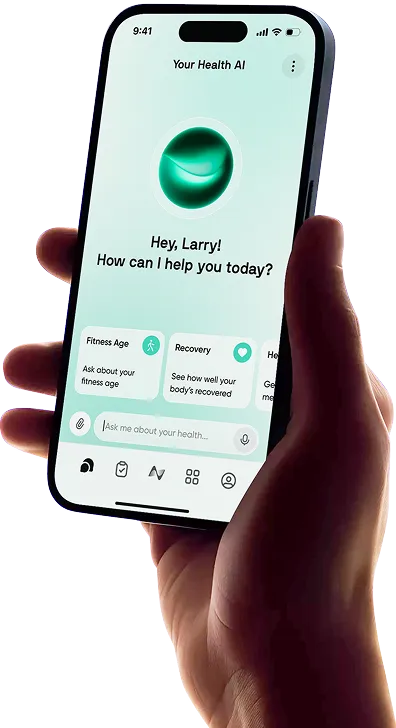
Bevel has quickly become one of the most popular health apps for people who want more from their wearable data. It brings sleep, recovery, stress, training, nutrition and long-term health measurements into one polished dashboard, without requiring users to buy another device.
The biggest change in 2026 is that nearly all of Bevel’s core tracking tools are now free. Recovery, Sleep, Strain, Stress, Energy Bank, Strength Builder and Nutrition Tracking are all available without a subscription. Bevel Pro now focuses on three advanced features: Bevel Intelligence, Health Records and Biological Age.
That makes Bevel Free one of the strongest health and fitness apps for iPhone and Apple Watch. However, it also makes the decision to pay for Pro less straightforward.
Bevel App Review: Quick Verdict
Category | Bevel Review |
|---|---|
Best For | Bringing recovery, sleep, stress, nutrition and training data into one app |
Platforms | iPhone, iPad and Apple Watch |
Compatible Data | Apple Health, Apple Watch, Garmin, Oura, Google Health, Fitbit and other compatible sources |
Free Plan | Includes almost all core tracking features |
Bevel Pro Price | $14.99 monthly or $99.99 annually |
Standout Feature | A broad set of free health and fitness dashboards |
Main Drawback | Pro is relatively expensive if you only want the AI coach |
Overall Verdict | One of the best free all-in-one health apps for iPhone users |
Our verdict: Bevel is a very good app, and its free plan will be enough for most users. Bevel Pro is best treated as an optional coaching and long-term health upgrade rather than an essential subscription.
How We Reviewed Bevel
This review evaluates Bevel’s current pricing, official feature documentation, device compatibility, scoring methodology and 2026 product updates.
We have also considered the practical questions that matter when choosing a health app: how much effort it requires, what you receive for free, whether its scores are understandable and how confidently those scores should be interpreted.
Editorial disclosure: This review is published by Neura Health, which offers an alternative health-data and coaching platform. We have aimed to assess Bevel fairly, including where it offers better value or a more appropriate experience. Readers can view our separate Bevel vs. Neura comparison for a more detailed breakdown of the two platforms.
What is the Bevel Health App?
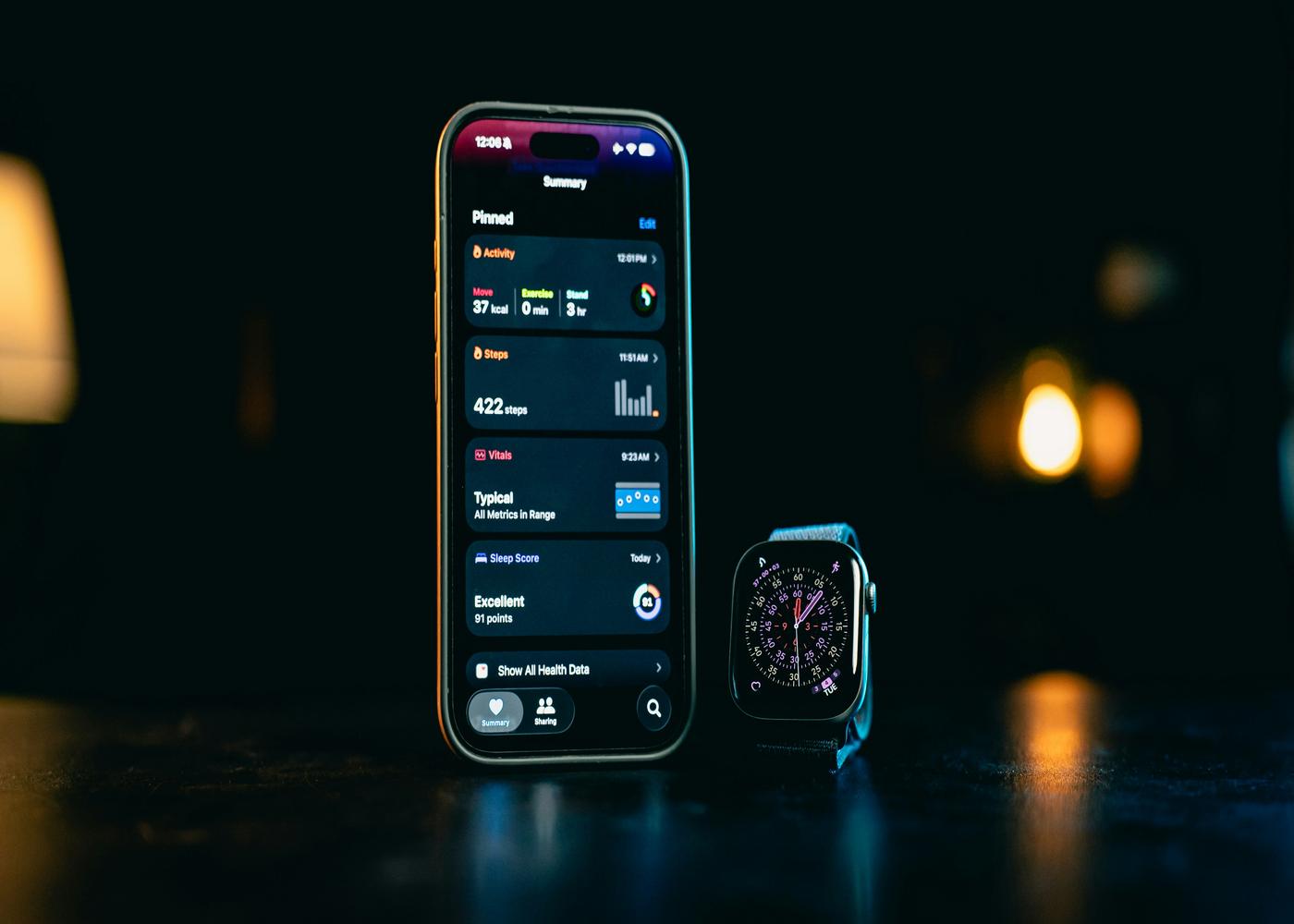
Bevel is an all-in-one health and performance app that organizes information from wearables, connected services and manual logs.
It uses measurements such as heart rate variability, resting heart rate, sleep, activity and respiratory rate to generate daily scores for Recovery, Sleep, Strain and Stress. It also includes nutrition tracking, strength-training tools, cycle tracking, health monitors and a journal for recording lifestyle habits.
Bevel began as a particularly attractive companion for the Apple Watch. It offered the recovery and strain experience associated with dedicated fitness wearables while allowing users to keep the watch they already owned.
The platform has since expanded. It now supports data from Garmin, Oura, Google Health, Fitbit and other sources, although the app itself remains centered on Apple’s devices. If Bevel does not suit your setup, our roundup of the best Apple Health alternatives covers several other options.
How Does Bevel Work?
Bevel combines imported wearable measurements with information logged inside the app.
It does not have a sensor or wearable of its own. Measurements such as sleep, heart rate and HRV must come from a compatible device or health-data source. Bevel then applies its own calculations to that information and presents the results through its dashboards and scores.
The app also collects information directly when you:
Log meals
Record journal entries
Track strength workouts
Add body measurements
Upload health records
Complete check-ins with Bevel Intelligence
This makes Bevel more than a simple Apple Health viewer. It is an interpretation and logging platform built on top of information collected from several possible sources.
Which Devices Work With Bevel?
The Apple Watch remains one of the simplest ways to use Bevel because it can supply the sleep, HRV, resting-heart-rate, activity and workout data needed for its principal scores.
Bevel also supports direct or connected data from Garmin, Oura, Google Health and Fitbit. Devices that write compatible information to Apple Health may also work, although the experience varies according to the available measurements.
Using more than one device requires some setup. If Garmin or Oura sends information to Bevel directly and through Apple Health, for example, the same sleep session or workout may be recorded twice. Bevel allows individual data sources to be hidden so users can choose one primary source for sleep, steps, calories and workouts.
This type of setup is important whenever you are consolidating health data from several devices. More sources do not automatically create better analysis if the information is duplicated or inconsistent.
How Long Does Bevel Take to Calibrate?
Bevel says it can take two to six weeks to establish a personalized baseline.
During this period, the app learns your typical heart-rate patterns, sleep behavior and response to physical strain. Recovery and Sleep scores also require sufficiently complete sleep data, including HRV and resting heart rate.
The app compares current measurements with a rolling personal baseline. Labels such as “above normal” and “below normal” refer to what is normal for you, rather than a universal target shared by every user.
This means the first few days should not be treated as a final test of Bevel’s accuracy. Wearing your device consistently, particularly during sleep, gives the app a better chance of producing stable and useful trends.

Bevel Health App: In-Depth Review
Bevel brings a wide range of health and fitness tools into one place, covering everything from sleep and recovery to strength training, nutrition and long-term health trends. Here is how its main features work and how useful they are in practice.
Recovery, Sleep and Strain
Recovery, Sleep and Strain form the core of the Bevel experience.
Recovery estimates how prepared your body appears to be for physical or mental stress. It considers measurements such as HRV, resting heart rate, sleep and recent exertion.
Sleep looks at the duration and quality of your rest. It is intended to show whether you are meeting your current sleep needs and how your nighttime data compares with your normal patterns.
Strain represents the amount of physical demand placed on your body during workouts and throughout the day. Higher strain is not automatically good or bad. Its usefulness depends on whether the effort is appropriate for your current recovery.
Together, the three scores create a simple cycle: strain increases the need for recovery, sleep supports that recovery, and the following day’s Recovery score can help inform how hard you train.
Bevel is one of several apps that interprets wearable information in this way. Our comparison of the best recovery and readiness score trackers explains how similar tools approach the same question.
Stress Score and Energy Bank
Bevel’s Stress Score attempts to show how much physiological stress your body is experiencing during the day. It uses available heart-rate information and related measurements to estimate when your system appears calm, balanced or under greater strain.
Energy Bank presents a more visual estimate of how much capacity you may have left. Sleep and recovery can recharge it, while activity, stress and workouts reduce it.
These features are easy to understand, but they should not be treated too literally. A low Energy Bank does not mean you have a precisely measured amount of energy remaining. It is a simplified interpretation of several signals.
The most useful approach is to compare the score with how you actually feel. If Energy Bank is regularly low on days when you feel tired, irritable or unusually sore, it may be highlighting a meaningful pattern.
Strength Builder
Strength Builder is one of Bevel’s strongest features, particularly because it is included in the free plan.
The exercise library contains more than 700 movements. Users can build workout templates, record sets and repetitions, monitor progression and receive real-time muscular-strain feedback. The Apple Watch app also supports workout tracking from the wrist.
Recent updates added features such as exercise previews, set editing, automatic template updates, rest timers and a plate calculator. Bevel Intelligence can also generate strength workouts, although the quality and suitability of any generated routine should still be checked before training.
Strength Builder makes Bevel more useful for resistance training than health apps that estimate effort using heart rate alone. Heart rate can show cardiovascular demand, but it does not fully represent the muscular load of heavy lifting.
Nutrition Tracking
Bevel includes a broad nutrition tracker with barcode, image, recipe and text-based logging. Its food database contains millions of items, and users can monitor calories, macronutrients and overall food quality.
The Nutrition Score focuses on the quality of the day’s diet rather than judging each food in isolation. This can make the feedback feel less restrictive than a basic calorie counter.
Photo and conversational food logging make the feature easier to use, but estimated portions can be inaccurate. A photograph cannot always identify hidden oils, exact serving sizes or every ingredient in a mixed meal. Users who need precise nutrition data should verify the entries rather than accepting every estimate automatically.
Optional glucose tracking is also available when compatible data is connected. Glucose readings can add context, but short-term changes should not be interpreted as a diagnosis or as proof that a particular food is inherently unhealthy.
Journal and Lifestyle Insights
The Journal allows users to record habits such as hydration, sunlight, alcohol, screen time and other daily behaviors.
Over time, Bevel can compare those entries with changes in sleep and recovery. You might notice, for example, that your Recovery score tends to be lower after late meals or that regular morning light is associated with more consistent sleep.
These are correlations, not proof of cause and effect. The value comes from noticing patterns worth testing more carefully.
This is also why choosing the right measurements matters. Our guide to what to track for a fuller picture of your health can help you avoid filling your dashboard with information that never changes your decisions.
Cycle Tracking and Health Monitors
Bevel can sync menstrual-cycle information from Apple Health and provide phase predictions and contextual insights. Users can also record symptoms and flow.
The Biology and Health Monitor areas organize measurements such as heart rate, HRV, resting heart rate, respiratory rate, blood oxygen, blood pressure, VO2 max and body composition when those data are available.
The benefit is convenience. Instead of searching through several parts of Apple Health or different wearable apps, users can view important trends together.
However, the app’s display does not change the clinical meaning of the measurements. Concerning blood pressure, heart rhythm, blood oxygen or laboratory results should be discussed with a qualified healthcare professional.
Bevel Intelligence
Bevel Intelligence is the principal feature behind the Pro subscription.
It acts as an AI health coach and data analyst. Users can ask questions about their sleep, recovery, nutrition, workouts and biomarkers. It can also produce training plans, support meal planning, perform custom analysis and provide regular check-ins.
Bevel Intelligence V2 added coaching personalities, longer-term Files, proactive check-ins, calendar connections and different response modes. It can generate cardio and strength workouts around the user’s schedule.
This makes Bevel easier to use for people who want explanations rather than another dashboard. Instead of seeing a lower Recovery score and guessing why it changed, you can ask Bevel Intelligence to examine recent sleep, training and journal information.
There are still limitations. An AI coach can misinterpret incomplete data, overlook important medical context or provide advice that is unsuitable for a particular injury or condition. Its responses should be treated as wellness guidance rather than medical instruction.
Pro also includes a weekly allowance for Bevel Intelligence usage. Messages and AI check-ins count toward that allowance, while standard tracking and certain free AI logging tools do not. Additional usage may require purchasing more credits.
Health Records
Bevel Pro allows users to upload laboratory results, bloodwork and other health documents. Compatible biomarkers then appear in the Biology section, where changes can be viewed over time.
Bringing wearable and laboratory data into one place can make longer-term patterns easier to follow. However, laboratory values require context. Reference ranges, medications, recent illness, testing conditions and medical history can all affect interpretation.
Bevel can help organize results and explain terminology, but it cannot replace a clinician. The same principle applies to any platform designed to help you understand your health data.
Biological Age
Bevel’s Biological Age is a Pro feature that combines wearable data, daily habits and available bloodwork into a long-term health estimate. It is recalculated weekly.
The feature is likely to appeal to users interested in longevity because it turns several measurements into one easily understood number. It may also provide motivation when healthier routines produce a more favorable trend.
However, biological age is not something an app can directly observe. It is an estimate created from selected inputs and Bevel’s model. A lower score does not prove that you have reversed aging, and a higher score does not diagnose poor health.
The most sensible way to use Biological Age is as a trend within Bevel. Avoid comparing it directly with results from a different aging clock because the two systems may use completely different measurements and assumptions.
Is the Bevel App Accurate?
Bevel can be directionally useful, but “accuracy” depends on what part of the app you are discussing.
The Source Data
Bevel relies on data generated by your Apple Watch, Garmin, Oura Ring, Fitbit or another connected source. A loose device, missing sleep data, inconsistent wear or poor sensor contact can affect the information before Bevel analyzes it.
The app cannot correct every problem in the original measurement.
Bevel’s Calculations
Recovery, Strain, Stress, Energy Bank and Biological Age are calculated by Bevel. They are interpretations rather than directly measured physical properties.
Bevel uses a personal baseline, which is useful because your normal HRV or resting heart rate may differ considerably from someone else’s. It also means your score can change as the baseline changes.
Different apps may give you different recovery scores on the same morning. This does not automatically mean that one is broken. Bevel, Athlytic, WHOOP and Oura use different formulas, data windows and weighting systems.
Data Consistency
Bevel becomes more useful when it receives consistent data over several weeks. Missing overnight HRV or resting-heart-rate information can prevent Recovery and Sleep scores from appearing.
Users with multiple devices must also check their source settings. Duplicate workouts, steps or sleep sessions can distort the picture.
For a broader explanation of this problem, read our guide to turning wearable metrics into more useful health insights.
Is Bevel Medically Accurate?
Bevel should not be treated as a medical diagnostic tool.
It is not accurate to describe all Apple Watch sensors or Bevel scores as “medical-grade.” Some Apple devices contain regulated features for specific purposes, but that does not make every measurement or third-party calculation a clinical result.
Bevel can help identify trends and organize measurements. It cannot diagnose illness, determine the cause of a low recovery score, or confirm that its Biological Age represents your body’s literal age.
Bevel Free vs. Pro
The free plan is unusually comprehensive. Most people can experience Bevel’s principal tracking features without paying.
Feature | Bevel Free | Bevel Pro |
Recovery, Sleep and Strain | ✓ | ✓ |
Stress and Energy Bank | ✓ | ✓ |
Nutrition Tracking | ✓ | ✓ |
Strength Builder | ✓ | ✓ |
Journal and Cycle Tracking | ✓ | ✓ |
Health Monitors | ✓ | ✓ |
Apple Watch App and Widgets | ✓ | ✓ |
Bevel Intelligence | ✓ | |
Health Records | ✓ | |
Biological Age | ✓ |
Bevel Free
Bevel Free costs nothing and includes the full core tracking experience. It is not a short trial or severely restricted demo.
You can use Recovery, Sleep, Strain, Stress, Nutrition Tracking, Strength Builder, Energy Bank, Fitness Tracking, Cycle Tracking, Health Monitors, Journal, widgets and the Apple Watch app.
Bevel says existing free features will remain free. New features developed in the future may still be added to Pro.
Bevel Pro
Bevel Pro currently costs:
$14.99 per month
$99.99 per year, equivalent to approximately $8.33 per month
$10.99 per month with a 12-month commitment in eligible regions
The 12-month commitment option is not currently available in the United States or Singapore. Pricing outside the US is determined through Apple’s regional App Store tiers.
Bevel Pro also supports Apple Family Sharing for eligible family members.
Does Bevel Have a Free Trial?
Bevel may offer a free trial, but the availability and length can vary. Check the current upgrade screen inside the app before subscribing.
The standard Bevel Free plan can be used indefinitely, so you do not need a trial to test the main tracking features.
Is Bevel Pro Worth It?
Bevel Pro is worth it if you regularly want the app to interpret your information, not simply display it. Bevel Intelligence, Health Records and Biological Age provide a more guided experience and bring additional context into the platform.
Pro is most likely to offer good value if you:
Use Bevel Intelligence several times each week
Want AI-generated training or nutrition guidance
Plan to upload and monitor bloodwork
Find Biological Age motivating
Want proactive check-ins and accountability
Can share the subscription with family members
The annual plan provides much better value than paying monthly for a full year. At $99.99 annually, it costs approximately $80 less than 12 monthly payments.
However, Bevel Pro is not necessary for most of the features that made Bevel popular. If your main interests are recovery, sleep, stress, nutrition or strength training, the free version already covers them.
Stay with Bevel Free if you:
Mainly want Recovery, Sleep and Strain scores
Prefer interpreting your own dashboards
Already use another AI health coach
Do not intend to upload health records
Are not interested in a Biological Age estimate
Would only open the AI coach occasionally
The simplest answer is that Bevel itself is worth using, but Bevel Pro is only worth paying for when its three exclusive features become part of your routine.
Bevel Pros and Drawbacks
Bevel offers an impressive range of free health and fitness tools, but its Apple-focused design, data requirements and premium features will not suit everyone.
What Bevel Does Well
Bevel’s greatest advantage is the amount of functionality included for free. It can replace several separate apps for users who want to track sleep, recovery, stress, workouts and nutrition in one place.
The interface is polished and makes complex measurements easier to scan. Strength Builder adds meaningful resistance-training support, while the newer Garmin, Oura and Google Health connections make Bevel less dependent on a single wearable.
The app also allows users to decide how deeply they want to engage. Someone can check a few daily scores, while a more committed self-tracker can explore long-term charts, nutrition, journal correlations and health records.
Where Bevel Falls Short
The app remains tied to Apple’s software ecosystem, even though it can import data from non-Apple wearables. Android users will need to consider one of the best Bevel alternatives.
Its breadth can also become overwhelming. Sleep, Recovery, Strain, Stress, Energy Bank, Nutrition Score and Biological Age all compete for attention. Users need to decide which measurements actually help them make better choices.
Pro is harder to recommend at $14.99 per month if the AI coach is the only exclusive feature you expect to use. The weekly Intelligence allowance also means the paid service is not completely unlimited.
Finally, its scores can appear more precise than they really are. Recovery percentages and age estimates should guide reflection, not overrule symptoms, common sense or professional medical advice.
Bevel Alternatives
Bevel is a strong choice for bringing health and fitness data together, but it may not be the best fit for every device, budget or tracking style. The following alternatives offer different strengths, from detailed Apple Watch analysis and dedicated recovery tracking to broader, more personalized health guidance.
Athlytic
Athlytic is Bevel’s closest Apple Watch-focused competitor. It provides recovery, exertion, sleep and training insights using data already stored in Apple Health.
Athlytic may suit users who want a more focused performance dashboard, while Bevel offers broader nutrition, strength and lifestyle tools. Read our complete Athlytic app review for a closer comparison.
WHOOP
WHOOP combines its own screenless wearable with an app built around Recovery, Strain and Sleep. It offers a more controlled hardware and software system, but requires an ongoing membership.
Bevel is the better-value option if you already own a compatible wearable. WHOOP may appeal more to users who want dedicated 24-hour tracking and do not mind wearing a separate device. Our guide to the best WHOOP alternatives covers both Bevel and several other options.
Oura
Oura is strongest for sleep and overnight recovery. Its ring is comfortable for many users, but it requires a hardware purchase and ongoing membership.
Bevel can import Oura data and provide a broader dashboard for workouts, strength, nutrition and lifestyle tracking. Some users may therefore use Oura as the data source and Bevel as the interpretation layer.
Neura Health
Neura Health is designed for users who want to connect health information and turn it into adaptive daily guidance.
Bevel excels at presenting scores and dashboards. Neura takes a broader HealthOS approach, bringing together information from wearables, apps and other health sources before using it to build personalized plans.
Its health-data integrations include popular wearable, fitness and nutrition platforms. Neura then uses the connected information to adjust personalized Health Plans around changes in sleep, recovery, activity and the user’s wider goals.
Choose Bevel if you prefer a polished tracking dashboard and want extensive free features. Consider Neura if you want a system that connects fragmented information and places more emphasis on what to do next.
Final Thoughts: Is Bevel a Good App?
Yes, Bevel is a very good health and fitness app, particularly for iPhone users who already own a compatible wearable. Its free version provides more functionality than many paid competitors, with useful tools for sleep, recovery, stress, nutrition and strength training.
Bevel Pro is a more difficult decision. At $99.99 per year, it makes sense for people who will regularly use Bevel Intelligence, upload health records or follow Biological Age trends. If those features do not interest you, the free version is the better choice.
Bevel will not replace medical care, and its scores should not control every decision you make. Used sensibly, however, it can make scattered wearable measurements much easier to understand.
Medical disclaimer: Bevel and Neura are wellness and educational tools. They do not provide medical advice, diagnosis or treatment. Speak with a qualified healthcare professional about symptoms, abnormal readings, laboratory results or changes to medication and treatment.
Article FAQ
Is the Bevel app free?
Yes. Bevel has a free plan that can be used indefinitely. It includes Recovery, Sleep, Strain, Stress, Energy Bank, Nutrition Tracking, Strength Builder, Fitness Tracking, Cycle Tracking, Health Monitors, Journal, widgets and the Apple Watch app. The free plan is substantial enough for most people who primarily want health and performance tracking. Bevel Pro is only required for Bevel Intelligence, Health Records and Biological Age.
How much does Bevel Pro cost?
Bevel Pro costs $14.99 per month or $99.99 per year in the United States. An eligible 12-month commitment plan costs $10.99 per month, although this option is not currently available in the US or Singapore. Prices in other regions are set through Apple’s local App Store pricing. Trial availability and duration can vary, so check the upgrade screen inside the app for the current offer.
Is Bevel Pro worth it?
Bevel Pro is worth it for users who regularly want AI coaching, plan to import bloodwork and clinical records, or value the Biological Age feature. It is less compelling if you mainly want sleep, recovery, stress, nutrition or workout tracking because all those features are included in Bevel Free. The annual plan offers better value than paying monthly, but only if the Pro features will become a regular part of your routine.
How accurate is the Bevel app?
Bevel can provide useful trends when it receives consistent data from a reliable wearable. Its accuracy depends on the source device, how regularly it is worn and whether sleep, HRV and resting-heart-rate measurements are complete. Recovery, Strain, Stress and Biological Age are proprietary estimates, so they may differ from scores shown by Athlytic, WHOOP or Oura. They should be treated as wellness guidance rather than clinical measurements.
Does Bevel work without an Apple Watch?
Yes. Bevel can work with data from Garmin, Oura, Google Health, Fitbit and other compatible sources. However, the app itself remains part of Apple’s software ecosystem, and some features depend on the type and completeness of data supplied by the connected device. Users combining several sources should check their settings carefully to prevent duplicate sleep, step or workout information.
How long does Bevel take to calibrate?
Bevel says its personalized calibration period normally takes two to six weeks. During that time, it learns your typical sleep, heart-rate and recovery patterns. You may see scores sooner, but they should become more personalized as additional data is collected. Wearing your device consistently during sleep and confirming that HRV and resting-heart-rate measurements are available will help Bevel establish a more reliable baseline.