
Bevel vs Neura: Which is The Best "All-in-One" Health App?
Tech
Key Findings
Bevel provides Apple users with a conversational interface and simple daily scores for recovery and strain within a single ecosystem. Neura operates as a device-agnostic health operating system, utilizing proactive background analysis across multiple wearables to track long-term performance and metabolic trends. Choosing between them depends on whether you prefer a streamlined, Apple-integrated conversational experience or a complex, multi-device analytical hub.
Why you Should Care?
Bevel and Neura are the leading apps for all-in-one health and fitness support. But which one is right for you?
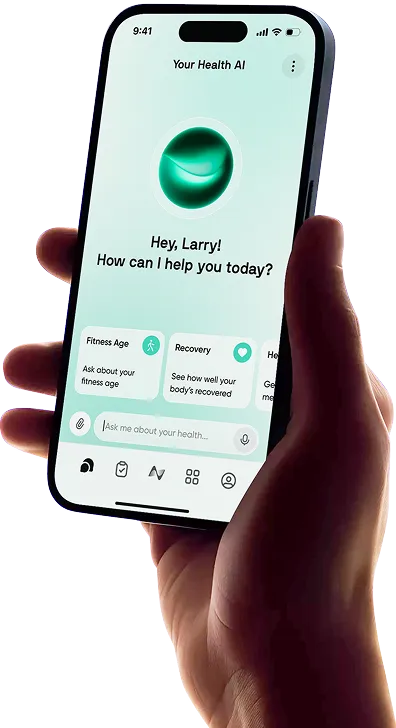
Bevel is one of the most complete health and fitness apps for iPhone, bringing sleep, recovery, stress, workouts and nutrition into one polished platform. The problem for Android users is simple: Bevel does not currently have an Android app.
Connecting a Garmin, Oura Ring or Amazfit device does not change that. Bevel can import information from several non-Apple wearables, but the application itself remains available on iOS. Android users therefore need an alternative that can provide a similarly broad view of their health without requiring an iPhone.
Neura Health is one of the closest alternatives. It works across Android and Apple devices, connects information from more than 50 health and fitness services, and combines that data with an AI coach and adaptive Health Plans.
The short answer: Choose Bevel if you use an iPhone and want detailed recovery, sleep, strain, nutrition and strength-tracking tools, most of which are free. Choose Neura if you use Android or want a broader health system that connects multiple data sources and turns them into personalized daily guidance.
Bevel vs Neura at a Glance
Category | Bevel | Neura |
|---|---|---|
Best for | Detailed health and fitness tracking on iPhone | Connected health data and adaptive daily guidance |
Android app | No | Yes |
Apple support | iPhone, iPad and Apple Watch | Apple and Android ecosystems |
Connected devices | Apple Watch, Garmin, Oura and Amazfit | 50+ apps, wearables and compatible health devices |
Main approach | Daily scores, tracking tools and AI interpretation | HealthOS with connected data, AI coaching and Health Plans |
Sleep and recovery | Built-in Sleep and Recovery scores | Interprets data from connected services and wearables |
Workout tools | Strength Builder, Strain and fitness tracking | Personalized plans, activity tracking and connected workout data |
Nutrition | Built-in food logging and Nutrition Score | Nutrition tracking, plans and third-party integrations |
AI coach | Bevel Intelligence with Pro | Neura Agent, with premium persistent memory through Neura iQ |
Free plan | Most core tracking features | AI chat, one active goal, one integration and a Basic Health Plan |
Premium price | $14.99 monthly or $99.99 annually | $29 monthly or $19 monthly when billed annually |
Best Android choice | Not available | Neura |
Prices and plan features were checked in September 2026 but may change. Review the current Neura pricing and Bevel membership information before subscribing.
Is Bevel Available on Android?
No. Bevel is not currently available as an Android app, and its official website directs users to download it for iOS.
This can be confusing because Bevel supports several devices commonly used with Android phones, including Garmin, Oura and Amazfit. Wearable compatibility and phone compatibility are not the same thing. A Garmin watch may send information to Bevel, but you still need a supported Apple device to run the application.
What Is the Bevel Health App?
Bevel is an all-in-one health and fitness tracker that turns wearable measurements and manual logs into daily scores, trends and recommendations.
Its principal dashboards cover Recovery, Sleep, Strain, Stress and Energy Bank. The app also includes Strength Builder, nutrition tracking, cycle tracking, health monitors, a journal and longer-term biological measurements.
Bevel is particularly strong for people who want to inspect their information. Its daily scores provide a quick overview, while deeper charts show HRV, resting heart rate, sleep, respiratory rate, workouts and other trends.
Nearly all the core tracking experience is now free. Bevel Free includes:
Recovery, Sleep, Strain and Stress
Energy Bank
Nutrition Tracking
Strength Builder
Fitness and cycle tracking
Health Monitors and Journal
Apple Watch features, widgets and complications
Bevel Pro adds Bevel Intelligence, Health Records and Biological Age. Its AI can answer questions about connected data, perform custom analysis, support nutrition and training plans, and provide accountability check-ins.
Our full Bevel app review examines these tools in more detail.
The main limitation is platform access. Bevel may accept data from several wearable brands, but Android phone users cannot currently use the app itself.

What Is Neura Health?
Neura is a Health Operating System designed to bring fragmented health information together and turn it into practical guidance.
Instead of centering the experience on a small group of proprietary daily scores, Neura connects data from compatible wearables, fitness apps, nutrition platforms and health services. Its 360° Health Sync currently supports more than 50 integrations, including Apple Health, Samsung Health, Garmin, Oura, Fitbit, Withings and WHOOP.
The platform then uses that information across two central features:
Neura Agent, a personal AI health coach that can answer questions using connected data and previously supplied context
Custom Health Plans, which break larger goals into practical tasks and can adapt guidance as new information becomes available
This makes Neura a closer Bevel equivalent for Android than a basic fitness tracker.
Neura Basic is free and includes AI chat with session-only memory, one active goal, up to 20 tasks, one daily-syncing integration and up to five Health Hub widgets. Neura iQ adds unlimited AI messages, persistent memory, multiple Health Plans and wider real-time syncing.
Bevel vs Neura: The Main Differences
Device and Platform Compatibility
This is the decisive difference for Android users.
Bevel is an iOS application. Its support for Garmin, Oura and Amazfit makes it more flexible for iPhone owners, but it does not remove the need for an Apple device.
Neura is built for Android and Apple users. It can connect with Samsung Health as well as popular cross-platform services and wearables. You can review the current options on Neura’s supported devices and apps page.
Neura is also better suited to people who use more than one ecosystem. Someone might track sleep with Oura, workouts with Garmin and body composition with Withings. Neura can function as the central layer across those sources, although users should still choose primary sources carefully and check for duplicated data.
Tracking and Daily Scores
Bevel has the advantage for users who want an immediate, polished tracking dashboard. Recovery, Sleep, Strain, Stress and Energy Bank make it easy to scan how the body appears to be responding each day.
Strength Builder adds an exercise library, workout templates, set and repetition logging, progression tracking and Apple Watch support. Users who want a detailed gym log and recovery dashboard in one iPhone app may prefer Bevel.
Neura instead combines available measurements with the user’s goals and wider health context. Sleep and recovery information can influence a training task, while activity and nutrition data can inform a broader plan.
Our guide to turning wearable metrics into personalized health insights explains why that context can be more useful than isolated numbers.
AI Coaching and Memory
Both platforms now provide AI coaching, so the difference is no longer as simple as “Bevel tracks while Neura coaches.”
Bevel Intelligence can interpret Bevel data, answer questions, generate training and nutrition guidance, conduct custom analysis and provide check-ins. Bevel Pro includes a weekly Intelligence allowance, with extra credits available when it is exhausted.
Neura Agent works across the user’s wider health profile. The free version provides AI chat with session-only memory. Neura iQ adds unlimited messages and persistent multi-session memory, allowing past goals, preferences and discussions to inform later responses.
Neura is the better fit for someone who wants one coach across several connected platforms. Bevel Intelligence suits users who want AI explanations inside Bevel’s tracking environment.
Neither AI coach should be used to diagnose a condition or replace individualized medical care.
Health Plans and Next Steps
Bevel can generate training and nutrition plans through Bevel Intelligence. Its daily scores can also help users decide whether to train hard, reduce intensity or prioritize sleep.
Neura places greater emphasis on structured, goal-based planning. A Health Plan turns a broader objective into tasks, milestones and daily actions. This is useful for someone who does not simply want to know that recovery is lower, but wants the rest of the day’s plan to reflect that information.
The free plan supports one active goal, while Neura iQ supports multiple plans.
The difference is best described as dashboard-led versus plan-led. Bevel starts with tracking and adds coaching around it. Neura starts with the user’s goal and uses connected information to shape what happens next.
Nutrition and Health Records
Bevel includes built-in nutrition logging through barcodes, images, recipes, text and a large food database. Its Nutrition Score evaluates overall food quality, while optional glucose information can add more context where supported.
Neura connects with nutrition services and can use dietary information within Health Plans and Neura Agent conversations. The better option depends on whether you prefer logging food inside the main app or connecting an existing nutrition platform.
Bevel Pro also supports uploaded health records and bloodwork, with compatible biomarkers shown in its Biology area. Neura is designed to bring health and medical information into the wider user profile, although the records and integrations available depend on the connected service.
Laboratory results and wearable measurements still require context. An app can organize results and explain terminology, but it cannot replace a clinician. Neura’s guide to understanding health data explains how to use measurements without treating every change as a diagnosis.
Bevel vs Neura Pricing
Plan | Price | What it includes |
|---|---|---|
Bevel Free | $0 | Core sleep, recovery, strain, stress, nutrition and workout tracking |
Bevel Pro monthly | $14.99 per month | Bevel Intelligence, Health Records and Biological Age |
Bevel Pro annual | $99.99 per year | Same Pro features at approximately $8.33 per month |
Neura Basic | $0 | Core AI chat, one active goal, one integration and a Basic Health Plan |
Neura iQ monthly | $29 per month | Premium AI coaching, persistent memory, multiple plans and wider real-time syncing |
Neura iQ annual | $19 per month, billed annually | Same Neura iQ features at the lower annual rate |
Bevel Free provides more native tracking than Neura Basic, so many iPhone users will not need Pro.
Neura Basic introduces the planning and coaching experience, while Neura iQ costs more because it is intended to operate as a wider HealthOS across multiple services and goals.
Paying for Neura iQ makes little sense if you only want a recovery score, while Bevel Pro has no value if you cannot use an iPhone.
Should You Choose Bevel or Neura?
Choose Neura if:
You want help achieving your goals to feel effortless: You prefer a system that runs quietly in the background so you can focus on living rather than managing an app.
You are suffering from "Dashboard Fatigue": You are tired of staring at scores like a 64% recovery and wondering what to actually do with that information.
You want a "Living" health plan: You require a system that automatically reshapes your day, like adjusting your workout intensity, swapping sessions, or improving your sleep, based on real-time biometric shifts like a drop in HRV.
You use multiple tracking devices: You need a device-agnostic "integration layer" to merge data from a smartwatch, smart ring, and glucose monitor into one cohesive picture, or if you are looking for the best Bevel alternative for Android phones.
You prefer a proactive coach: Instead of you checking an app, you want your health data to come to you with specific, actionable decisions and personalized recaps.
Choose Bevel if:
You want to understand your "Energy Bank": You are looking for a real-time visualization of your physical capacity that helps you pace your day based on how much "fuel" you have left - that's the meaning behind the much-loved Bevel energy bank feature.
You are a dedicated Apple Watch or Garmin user: You want a native-feeling experience that deeply integrates with your preferred hardware and HealthKit to provide high-accuracy biometric monitoring.
You prioritize strength and cardio optimization: You want a comprehensive tool that includes a library of over 700 exercises, rest timers, and heart rate zone tracking to ensure you are training effectively for your goals.
You want evidence-based nutrition insights: You prefer a system that scores your food quality and tracks how your macronutrient intake directly impacts your recovery and daily energy availability.
You seek a "biology control panel": You want easy access to long-term trends for key biomarkers like VO2 Max, resting heart rate, and respiratory rate to monitor your overall health trajectory.
Final Thoughts: Is Neura the Best Bevel Alternative for Android?
Neura is one of the closest Bevel alternatives for Android because it combines connected health data, AI coaching and personalized planning in one platform. It does not copy Bevel feature for feature, but it addresses the same underlying need: making information from sleep, activity, nutrition and wearables more useful.
Bevel remains the stronger choice for iPhone users who want detailed daily scores, native Strength Builder tools and an unusually complete free tracking experience. Its support for Garmin, Oura and Amazfit also means Apple users are no longer limited to the Apple Watch.
Neura is the better choice for Android users and people whose health information is spread across several platforms. Its value lies in acting as a central intelligence layer, connecting those sources and using them to shape a personalized plan instead of leaving the user to interpret every dashboard alone.
If you want to test that approach before subscribing, Neura Basic is free and includes an introductory Health Plan, core AI chat and one connected integration.
Medical disclaimer: Bevel and Neura are health and wellness tools, not substitutes for professional medical advice, diagnosis or treatment. Speak with a qualified healthcare professional about symptoms, abnormal readings, laboratory results, medication or treatment decisions.
Article FAQ
Is Bevel available on Android?
No. Bevel does not currently offer an Android app. The app remains available for iPhone and other supported Apple devices. Bevel can import data from certain non-Apple wearables, including Garmin, Oura and Amazfit, but users still need an Apple device to run the application.
What is the best Bevel alternative for Android?
Neura is one of the closest all-in-one Bevel alternatives for Android. It connects information from more than 50 supported apps, wearables and health devices, including Samsung Health, Garmin, Fitbit, Oura, Withings and WHOOP. It then uses that information through Neura Agent and personalized Health Plans. Users primarily interested in workout logging or recovery scores may prefer a more specialized Android app.
Does Bevel work with Garmin or Oura?
Yes. Bevel supports direct Garmin and Oura connections. This allows an iPhone user to supply Bevel with health and fitness information from those devices. It does not mean Bevel can run on Android. Users should configure their data sources carefully to prevent the same workout or sleep session entering through both a direct integration and Apple Health.
Does Bevel work with Samsung Watch?
Bevel does not currently list Samsung Galaxy Watch as one of its main direct integrations. Some measurements may transfer indirectly through compatible health services, but availability and completeness can vary. Neura directly supports Samsung Health, making it a more straightforward option for Samsung and Android users.
Is Bevel coming to Android?
Bevel has not published a confirmed Android release date as of September 2026. Its official website continues to direct users to the iOS application. An Android version may be developed in the future, but users should not rely on an unconfirmed launch when choosing a health app today.
Is Neura better than Bevel?
Neura is better for Android users, people with health data spread across several services and anyone who wants adaptive plans and persistent AI coaching. Bevel is better for iPhone users who prioritize detailed recovery, sleep, strain, nutrition and strength-tracking dashboards. The best option depends on your phone, connected devices and whether you prefer analyzing scores or following a guided plan.