
Habitify vs Habitica vs Neura: Which is the Best Habit Tracker App?
Tech

Key Findings
Habitify is the strongest match for flexible schedules, progress tracking and automation across different parts of life. Habitica suits people who find game rewards, quests and shared accountability more motivating than charts. Neura is better suited to health habits that need a personalized plan around sleep, nutrition, exercise and recovery. Habitify also offers Habi AI, so the choice goes beyond a simple tracker versus an AI coach. Start with the support you will use, then check whether the free plan covers your routine.
If you already know which habits you want to build, Habitify and Habitica offer two very different ways to keep them going. Habitify helps organize your routines and review your progress. Habitica turns completed actions into rewards for a game character.
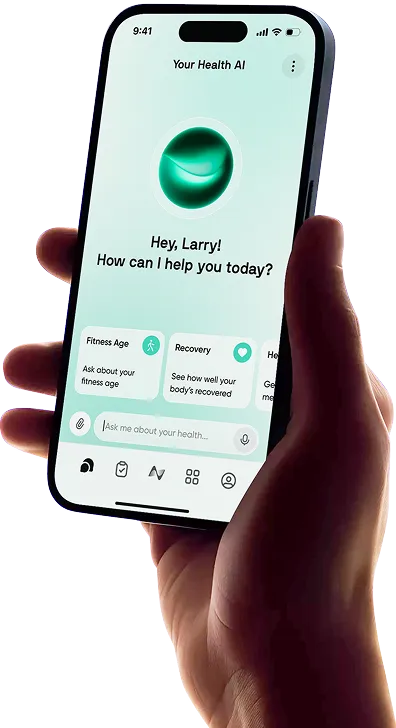
Neura focuses on health goals and the actions that support them. That makes it relevant when you want help deciding what to do, fitting it into your week and adjusting when circumstances change.
Those differences matter more than whether an app can display a streak. A reminder to take a lunchtime walk may be enough for one person. Another might enjoy completing the walk to help their party finish a quest. Someone else may want a plan that balances walking, training and rest around an unpredictable schedule.
This comparison looks at the daily experience, free features, paid upgrades and practical reasons to choose each habit tracker app.
Habitify vs Habitica vs Neura: Comparison at a Glance
The three apps suit different preferences, and each has a useful free starting point. Use the table to narrow the choice before comparing their daily routines.
Feature | Habitify | Habitica | Neura |
Best for | Flexible habits across work, home and health | Game-based motivation and accountability | Health habits within a personalized plan |
Main approach | Scheduling, tracking, reflection and automation | Complete real tasks to progress in a role-playing game | Turn health goals and context into daily actions |
Habits and tasks | Habits to build or reduce, with measurable goals | Habits, scheduled Dailies and one-off To-Dos | Health goals, milestones and supporting actions |
Free plan | Three actively tracked habits, one reminder per habit and Habi AI with a weekly allowance | Core task tracking and game progression | Core Agent, one active goal with up to 20 tasks and limited syncing |
Paid options | Plus: $29.99/year; Pro: $49.99/year in the U.S. iOS listing | Optional subscription: $4.99/month or $47.99/year | Neura iQ: $29 monthly plan advertised |
Scheduling and reminders | Flexible targets; more reminder options on paid plans | Repeating tasks, due dates and reminders | Actions and schedules organized around a Health Plan |
Progress review | Calendars, streaks, statistics and notes | Task colors, streaks and character progression | Goal progress alongside relevant health information |
Motivation and accountability | Visible progress, challenges and shared features | Gold, experience, equipment and party quests | Personalized guidance and progress toward a health goal |
AI and automation | Habi AI; Pro adds advanced integrations and automation | Game rules support motivation; core use involves checking off tasks | Agent guidance and connected health context |
Main drawback | Advanced tracking and integrations require Pro | The game adds another layer to manage | More scope and cost than a simple habit counter needs |
Prices were checked on October 23, 2026. These are published U.S. examples; offers can differ by region and platform. Annual prices cover the full year.
Choose Habitify for a flexible tracking system, Habitica for a game you want to return to and Neura for a health plan you want help shaping.
Habitify, Habitica and Neura: Key Differences

Before comparing individual features, think about what causes your routine to stall. Forgetting an action, losing interest and setting an unrealistic target call for different kinds of help.
Creating a Routine That Fits Your Week
“Stretch on Monday, Wednesday and Friday” is different from “stretch three times this week.” The first suits a predictable schedule. The second leaves room for a late meeting or a change of plans.
Habitify supports daily and longer-period goals, including weekly targets. You can track a measurable amount, such as minutes spent stretching, rather than treating every session as an identical checkmark. A beginner flexibility plan gives you specific movements to attach to that goal.
Habitica divides actions into three categories:
Habits: Actions you want to encourage or discourage, often without a fixed schedule.
Dailies: Repeating tasks that are due on a schedule.
To-Dos: One-off tasks, such as booking a class or buying walking shoes.
A lunchtime walk on working days belongs comfortably in Dailies. Taking an extra walk when an opportunity appears could be a positive Habit. Despite the name, Dailies do not have to happen every day.
Neura starts with the broader goal. Its Health Plans help organize the actions supporting that goal, with room to discuss timing and effort. It suits someone who wants help deciding how much to take on.
Habitica vs Habitify: Reminders, Rewards and Reasons to Return
Habitify makes completion visible through progress views, streaks and milestones. Its challenges and shared features also offer motivation beyond tracking alone.
Habitica ties real actions to a game. Completing a task earns rewards, including gold and experience, which help your character progress. Parties let people work toward quests together.
The appeal depends on whether that extra layer interests you. If collecting equipment makes you more inclined to check in, it serves a purpose. If you would rather record a walk and close the app, managing a character may feel unnecessary.
Neura connects the action with the health goal behind it. You can discuss why a routine is difficult and ask for changes, rather than deciding every adjustment yourself.
Missed Days, Rest Days and Getting Back on Track
An app should distinguish between forgetting a task and deliberately taking a break.
Habitify lets you mark an individual habit as skipped. Pro adds Off Mode, which pauses habits and reminders while protecting streaks during a planned break.
Habitica can deduct your character’s health points for missed Dailies. Its Pause Damage setting prevents damage from your own missed Dailies, although party-related damage can still apply during quests. Set recurring tasks around the days you genuinely intend to do them.
With Neura, you can explain what changed and ask to revise the plan. If a long workout no longer fits Thursday, discuss a shorter session or moving it to another day. Active recovery ideas can help when lighter movement is the more useful choice.
If the same action keeps getting missed, review the target itself. A five-minute stretch you regularly do provides more useful information than repeatedly dismissing a reminder for half an hour.
AI Guidance, Automation and Health Context
Habitify’s Habi AI can create and edit habits, adjust reminders, manage logs and use your tracking history. With permission, it can also draw on supported calendar, task and health information.
Habi currently has a weekly usage allowance across membership tiers. The app’s health syncing and advanced automation are separate Pro features.
That makes Habitify a more capable option than a basic checklist. Neura’s distinction is its focus on organizing health goals across sleep, nutrition, movement and recovery through its Agent and Health Profile.
For example, Apple Watch sleep information and Garmin recovery-related metrics can add context when discussing a routine.
Automation also needs a clear definition. Importing a recorded walk can reduce manual logging. It does not tell an app that you prepared tomorrow’s lunch or put your phone away before bed. Some habits still depend on your check-in.


Habitify, Habitica and Neura Reviews

The best choice should remain useful once the novelty wears off. These reviews focus on what you would set up, check and change during an ordinary week.
Habitify Review: Flexible Tracking With Automation and AI Support
The Habitify habit tracker is a strong option when you want routines from different parts of life in one place. Reading, walking, stretching and reducing screen time can sit within the same system without needing the same schedule.
Habitify App Features
Habitify supports habits you want to build and behaviors you want to reduce. Goals can use quantities or time, while reminders, notes and progress views help organize and review the routine.
Paid plans expand its capabilities. Plus removes the core limits on habits, reminders and custom Areas. Pro adds features such as checklists, Off Mode, advanced timers, calendar connections and health syncing.
Habi AI adds another way to manage the system. You can ask it to update a habit or log information instead of navigating through settings.
Everyday Use
Start with a habit you can describe clearly: a ten-minute lunchtime walk on weekdays, for example. Give it a suitable schedule and reminder, then record what you do.
A note can explain why a session was missed or shorter than expected. That makes the history more useful when you review the week.
If lunch breaks keep disappearing, change the timing or target. Habitify’s flexibility is valuable here: you can adjust the routine rather than abandon the whole setup.
Pro automation can reduce logging for supported activities. Check the official documentation for the connections available on your platform.
Strengths and Drawbacks
Habitify works well for people who like organizing their own routines. It combines a broad range of schedules and progress tools with optional AI support.
It also gives you room to add context. Notes about a changing commute or a busy week can explain more than a broken streak alone.
The compromise is that its more advanced capabilities require Pro and some setup. Someone tracking two simple actions may have little reason to explore integrations, custom categories or automation.
Verdict: Habitify is the strongest fit for a flexible habit tracking app across daily life, particularly when you want control over schedules and progress review.
Habitica Review: Turning Habits and Tasks Into a Game
Habitica makes completing real-world actions part of a role-playing game. It can cover exercise and self-care alongside studying, household chores and work tasks.
Its central attraction is having a reason to return that goes beyond maintaining a streak.
Key Features and the Habitica App Interface
The Habitica app interface combines task lists with your character and game information. Habits, Dailies and To-Dos organize the real-world actions; rewards and character progression provide the feedback.
You earn gold and experience for completing tasks. Equipment, pets and other game elements give those rewards somewhere to go.
Parties and quests add shared progress. Challenges offer common task lists that participants can add to their routines.
Everyday Use
You could set a weekday walk as a Daily, reading as a positive Habit and clearing out a cupboard as a To-Do.
After completing an action, check it off and receive the game reward. With a party quest, those completions can also contribute toward a shared objective.
There is no need to build a complicated system immediately. A few meaningful tasks give you a chance to decide whether the game makes checking in more appealing.
Strengths and Drawbacks
Habitica’s core experience is usable for free. You can try its approach to motivation without first buying a subscription.
It is also well suited to people who enjoy shared goals. Completing your own tasks can contribute to something your friends are working on too.
The main drawback is the additional game management. You need to understand task types, character rewards and the consequences of missed Dailies. That can be enjoyable or distracting, depending on your preferences.
Game progress also needs sensible task design. Earning rewards for easy checkmarks is less useful if the actions you genuinely want to establish never get addressed.
Verdict: Habitica is the best fit here for readers who enjoy games and want real-world routines to contribute to character progression and shared quests.
Neura Review: Building Habits Around a Personalized Health Plan
Neura suits health habits that make more sense together. A more active week may involve walking, suitable workouts, meal preparation and enough time to recover.
Its role is to help organize those actions around your goal and circumstances.
Key Features
Neura Agent provides conversational guidance, while Health Plans turn goals into actions and milestones.
Its Health Foundations cover areas including nutrition, sleep, activity and recovery. Supported integrations bring relevant information from existing apps and devices into the wider picture.
That scope is useful when your difficulty is choosing a workable routine, rather than remembering a habit you have already defined.
Everyday Use
Start with the goal and the limits of your week:
“I want to become more active, but I work late on Tuesdays and Thursdays. Help me plan short sessions I can manage at home and walks during the working day.”
You can then discuss the proposed actions, reduce the effort or change the timing. If meal preparation is part of the problem, Neura’s personalized meal-planning tools can help with that part of the routine too. The same with sleep, stressors, motivation, or anything else.
As the week develops, explain what worked and what did not. Connected data can add context, but the details you share remain important.
Strengths and Drawbacks
Neura’s strength is connecting habits to a broader health goal. It can help you consider how several routines fit together and provide guidance when the original plan becomes difficult to follow.
It is less relevant for someone who wants a simple reading counter, a household chore game or a quick way to track three unrelated actions.
The paid plan also costs more than the annual tracking subscriptions compared here. Neura is currently in beta, so check access on your device before relying on it as your main app.
Verdict: Neura is the best fit for readers who want health habits organized within a personalized plan, with ongoing guidance as their routine changes.
Habitify Pricing, Habitica Subscriptions and Neura: Free vs Paid
The useful upgrade is the one that solves a problem you encounter regularly. More tracking capacity, optional game extras and broader coaching are three different reasons to pay.
Habitify Pricing: Free, Plus and Pro
Habitify Free supports three actively tracked habits and one reminder per habit, along with basic tracking and notes. Its Habi AI documentation describes a weekly allowance across all membership tiers.
Plus removes the limits on habits, reminders and custom Areas. Pro adds advanced features, including checklists, Off Mode, integrations and automation.
The current U.S. iOS listing shows:
Plan | Listed charge | Monthly equivalent |
Habitify Plus yearly | $29.99 for one year | About $2.50 |
Habitify Pro yearly | $49.99 for one year | About $4.17 |
Habitify Pro monthly | $8.99 per month | $8.99 |
Habitify Pro Lifetime | $119.99 once | No recurring payment |
The listing contains other offers too. Confirm the price available to your account.
In eligible regions, some Apple monthly-payment offers involve a 12-month commitment. Read the billing terms before treating an installment option as a subscription you can stop paying at any time.
Start with Plus if your main problem is the three-habit limit. Pro becomes more relevant when you want its specific tracking tools or connections.
Is Habitica Free, and What Does a Subscription Add?
Habitica’s core task tracking and game progression are free. You can use the system before deciding whether its optional extras interest you.
Subscriptions add game benefits such as special equipment and the ability to purchase Gems with earned gold. Gems are also sold separately as paid game currency.
The U.S. iOS listing gives optional subscriptions at $4.99 monthly or $47.99 yearly. The yearly option works out at about $4 per month, paid as a $47.99 annual charge.
A subscription makes sense when you enjoy the game and want those extras. It is not required simply to track your habits.
Neura Free vs Paid: When Does the Upgrade Make Sense?
Neura’s free plan includes core Agent access, one active goal with up to 20 tasks, up to five dashboard widgets and one integration with limited syncing.
Neura offers a $29 monthly Neura iQ plan. Paid access adds unlimited messages, persistent conversation memory, more advanced guidance and broader connected-data functionality. Check the current annual offer separately.
That price needs a different justification from a $29.99 annual habit tracker. Neura iQ makes more sense when you use the health planning and guidance regularly across several parts of your routine.
If you mainly want to record three actions, begin with a free tracker.
Which Offers the Best Value for Your Routine?
What you need | Best starting point | Reason to upgrade |
A few clearly defined habits | Habitify Free | You need more active habits or reminders |
Routines across work and home | Habitify Plus | You want unlimited core tracking |
Automatic logging and advanced tracking | Habitify Pro | Its supported connections reduce work |
Game-based motivation | Habitica Free | You enjoy the optional subscriber rewards |
Help building a health routine | Neura | You want more ongoing guidance and connected context |
Final Thoughts: Which Is the Best Habit Tracker App for You?
Habitify is the strongest choice when you want to organize your own routines, track progress and add automation where useful. Habitica is the better match when rewards and shared quests make you want to return. Neura suits people who want their health habits to form part of a personalized plan.
Try the free version with a small routine before paying. Include an action you already do fairly reliably and one you want help establishing. That lets you assess the app without building a long list of new commitments.
After a week, look beyond the number of checkmarks. Did the reminders arrive at a useful time? Did the game make you more interested? Did the guidance help you choose actions you could fit in?
Those answers are more useful than choosing the app with the longest feature list.
Article FAQ
What Is the Best Habit Tracking App?
Habitify is a strong choice for flexible schedules and progress tracking. Habitica suits people who enjoy game rewards and shared quests. Neura is better suited to health habits that need a personalized plan and ongoing guidance. The best option depends on the support that helps you follow through.
What Is Habitify?
Habitify is a habit tracker for routines you want to build or behaviors you want to reduce. It offers schedules, reminders, measurable goals, progress views and notes, with additional automation and integrations on Pro. Its Habi AI assistant can help manage habits and review tracking information.
Is Habitify Free?
Yes. Habitify Free supports three actively tracked habits and one reminder per habit. Plus adds unlimited habits, reminders and custom Areas. Pro adds advanced tracking and connected features. Habi AI currently has a weekly usage allowance across membership tiers.
What Is Habitica Used For?
Habitica helps organize habits, repeating tasks and one-off jobs through a role-playing game. You complete actions in real life, then check them off to earn rewards and progress your character. It can cover exercise, studying, household chores, work and other personal goals.
What Are Some Habitica Alternatives?
Habitify is an alternative for flexible tracking, reminders and progress review. Neura suits health-focused routines that need personalized planning and guidance. If you are looking for apps like Habitica, first decide whether you want another game or a different way to stay consistent.
Can Neura Help With Habits Without a Wearable?
Yes. You can begin with your goals, preferences and information about your routine. A wearable is optional. Connected activity, sleep and other health data can provide additional context, but you can still discuss a plan, follow actions and request changes without one.