
Google Health Premium vs Free: Is the Subscription Worth It?
Tech

Key Findings
Google Health Free already includes most core tracking features, including activity, sleep, Readiness, vitals, nutrition, and cycle tracking. Google Health Premium costs $9.99 per month or $99 per year and mainly adds Google Health Coach, personalized plans, and daily AI guidance. It offers the most value to Fitbit and Pixel Watch users who want help interpreting their data.
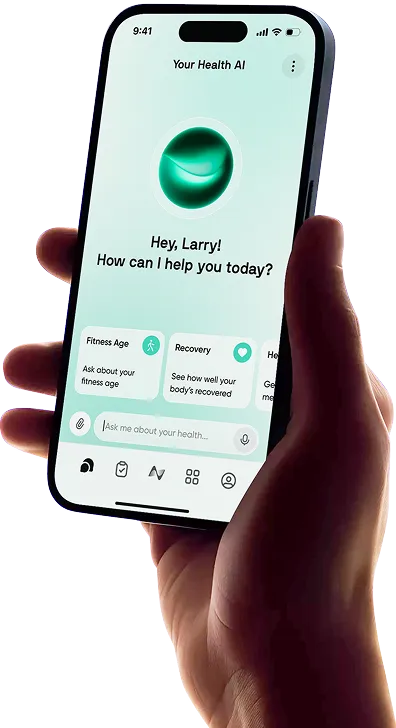
Google Health Premium focuses less on unlocking extra health data and more on adding personalized coaching and guidance.
The free Google Health app already gives compatible Fitbit and Pixel Watch users access to a wide range of fitness, sleep, recovery, and wellness metrics.
These include steps, Cardio Load, Readiness, Sleep Score, heart rate, HRV, and SpO₂. You can also log nutrition, hydration, moods, and cycle information without paying.
Premium is primarily about what Google does with that information.
The main addition is Google Health Coach, a Gemini-powered AI coach that can interpret your data, create adaptive fitness plans, and give you personalized guidance throughout the day.
That makes the Google Health vs Google Health Premium decision less about getting more numbers and more about whether you want help figuring out what those numbers mean.
What Happened to Fitbit Premium?
Fitbit Premium was officially renamed Google Health Premium on May 19, 2026, when Google began rolling out its redesigned Google Health app.
The Fitbit app itself also became Google Health, bringing Fitbit tracking, Pixel Watch data, and Google's new health coaching features into the same platform.
Existing Fitbit Premium members were moved into the new Premium experience rather than being placed on a completely separate service.
The biggest new feature is Google Health Coach, which is now the centerpiece of the paid tier.
Google Health Premium vs Free: Comparison at a Glance
The free version covers most everyday tracking, while Premium focuses on turning that data into personalized recommendations.
Comparison | Google Health Free | Google Health Premium |
Best For | Tracking health and fitness data | Personalized coaching and adaptive plans |
Price | Free | $9.99/month or $99/year |
USP | Comprehensive tracking without a subscription | Google Health Coach powered by Gemini |
Health Tracking | Activity, sleep, readiness, vitals, nutrition, and cycle tracking | The same tracking with personalized interpretation |
Fitness Plans | Manual workout and goal tracking | Adaptive weekly plans, tailored workouts, and workout library |
Daily Guidance | Standard scores, charts, and trends | Proactive morning, post-workout and evening insights |
AI Coaching | Not included | Conversational fitness, sleep and wellness coaching |
Device Requirements | Phone tracking or a compatible Fitbit/Pixel Watch | Health Coach currently requires a compatible Fitbit or Pixel Watch |
The current Google Health Premium cost is $9.99 per month or $99 per year in the US.
What Do You Get With Google Health Free?

Google has left a surprisingly large portion of the core tracking experience outside the paywall. Which metrics you see still depends on your connected device, but Premium isn't required to view most of the health data your wearable collects.
Activity and Fitness Tracking
Free users can track everyday activity such as steps, distance, and estimated calories burned, along with workouts and exercise history.
Supported wearables can also provide Cardio Load and VO₂ max, while Google Fitbit Air includes Readiness as part of its standard Google Health experience.
You do not necessarily need a wearable for basic activity tracking either. Google Health can use a compatible phone to track steps, distance, and calories, and you can start certain workouts directly from the phone.
The experience is much more limited without a Fitbit or Pixel Watch, but the app is not completely dependent on wearable hardware.
Sleep and Readiness Data
Sleep tracking is also well represented in the free tier. With supported hardware, Google Health shows sleep duration, sleep stages, Sleep Score, sleep schedules, and related trends.
Readiness uses signals including HRV, resting heart rate, and recent sleep to estimate how recovered you are.
Premium can use that score to adjust coaching and training recommendations, but the underlying recovery data is part of the base Google Health experience on current supported devices such as Fitbit Air.
Vitals and Health Trends
Depending on your device, Google Health can bring together heart rate, resting heart rate, HRV, breathing rate, SpO₂, and skin-temperature variation.
The Health tab organizes these measurements so you can look at individual readings as well as longer-term trends.
Supported devices may also provide health alerts or help you see when measurements move outside your normal range.
However, Premium does not determine whether your wearable can collect a particular metric. That depends on the sensors and features built into the device.
Nutrition, Cycle and Stress Tracking
Google Health goes well beyond exercise data even without Premium. The app includes tools for logging calories, macronutrients, and hydration, along with weight and other metabolic information.
Cycle tracking can be used to log periods, symptoms, moods, sexual activity, and other cycle information, and period tracking works even without a connected wearable.
Google also includes mental-wellness tools such as mindfulness tracking, moods, body responses, and resilience metrics on compatible hardware.
There is additional Premium mindfulness and wellness content, but the core logging and tracking tools themselves are not entirely locked behind the subscription.
Medical Record Syncing
Medical-record syncing is another feature that does not automatically require Premium.
Eligible users can connect supported healthcare providers and view information such as medications, allergies, vaccinations, lab results, conditions, and visits within Google Health.
Direct medical-record syncing currently requires records from a US healthcare provider and has additional device and eligibility requirements.
Premium changes what you can do with those records. With Google Health Coach enabled, eligible users can ask questions about their records or request summaries.
That Coach-based medical-record feature is currently limited to the US.


What Does Google Health Premium Add?

The main reason to consider a Google Health Premium subscription is Google Health Coach.
Instead of simply opening individual dashboards and trying to interpret the numbers yourself, you can ask the Coach questions and receive guidance based on the health data you have chosen to share.
Google Health Coach Powered by Gemini
Google Health Coach is built with Gemini and can draw from Fitbit or Pixel Watch data, your account profile, and connected third-party health information.
It is designed to look across different areas of your health rather than treating sleep, exercise, and wellness as completely separate categories.
Personalized Fitness Plans
You can ask the Coach to create a weekly fitness plan based on your goals, preferences, and current level.
Rather than handing everyone the same schedule, it can tailor the plan around what you want to accomplish.
Adaptive Weekly Targets and Workouts
Premium plans include personalized weekly targets and recommended workouts. The Coach can also take your recent activity and recovery into account when shaping the rest of the week.
This is one of Premium's more useful advantages if you already track Cardio Load and Readiness but are not sure how to translate those scores into an actual training plan.
Conversational Plan Adjustments
Plans are not fixed once they are created. You can talk to the Coach if something changes, such as needing a shorter workout or wanting to change the intensity, and adjust targets, sets, reps, or workout duration.
That makes the feature more flexible than following a static workout calendar.
Proactive Daily Coaching
You do not always have to start the conversation yourself. Google Health Coach can surface guidance throughout the day.
Morning messages can put your sleep and physical readiness into context. After exercise, the Coach can break down your workout and suggest areas for improvement.
In the evening, it can recap how your body responded to the day and how you are progressing toward your fitness plan.
Health and Performance Trend Analysis
You can also ask the Coach about patterns in your data. For example, it can look across fitness, sleep, and health trends rather than forcing you to compare several separate charts.
This is where Premium is more useful for people who collect plenty of wearable data but rarely know what to do with it.
The benefit is interpretation rather than another dashboard.
Personalized Sleep and Recovery Guidance
Premium does not suddenly give your Fitbit or Pixel Watch an entirely different set of sleep sensors.
Instead, it adds a layer of personalized interpretation on top of existing measurements.
Google Health Coach can summarize your sleep, help identify patterns in sleep consistency, and provide suggestions based on your goals and other health data.
It can also consider Readiness when making fitness recommendations, helping connect recovery with how hard you train.
Nutrition, Cycle and Wellness Insights
Because the Coach can work across different types of information, Premium can make logged nutrition, cycle, and wellness data more useful.
Google says the Coach can connect data including fitness and sleep metrics, nutrition, cycle tracking, and other health context.
Someone tracking workouts and menstrual-cycle information, for example, can ask questions that consider both rather than checking each section independently.
Asking Questions About Medical Records
Eligible US users who connect their medical records can allow the Coach to reference that information.
You might ask when you last received a vaccination, request a summary of your records, or ask what a particular lab measurement means.
That does not make Google Health Coach a medical professional.
Google explicitly describes its responses as informational wellness guidance rather than medical advice and recommends consulting a healthcare provider before making health-plan changes.
Google Health Premium Limitations

Premium is much more useful than the old subscription if you want coaching, but there are still a few important restrictions.
You Need a Compatible Fitbit or Pixel Watch
At the moment, Google Health Coach requires a supported Fitbit or Pixel Watch.
The free app can track some information using only your phone, but you cannot simply download Google Health and pay for Premium to get the full coaching experience without compatible hardware.
Google has said support for additional devices is coming, so this requirement could become less restrictive over time.
The Coach Is Restricted to Eligible Adult Users
Google Health Premium and its coaching features are currently limited to users who are at least 18 and live in a supported country.
Availability now covers the US, Canada, Mexico, the UK, and numerous countries across Europe and Asia-Pacific, but it is not worldwide.
Certain features have even narrower availability. Medical-record syncing and Coach questions based on synced clinical records, for example, currently have US-specific requirements.
AI Guidance Can Be Inaccurate
Gemini can interpret a lot of information quickly, but its answers should not be treated as guaranteed facts.
Google tells users to check responses for accuracy and states that the Coach is not intended for medical purposes.
That matters even more when asking about medical records, symptoms, or health conditions. The Coach can help explain information or identify questions worth discussing with your doctor, but it should not replace professional medical advice.
Device Features Still Vary
A Premium payment cannot give your wearable hardware it does not have.
Your available measurements still depend on the sensors inside your Fitbit or Pixel Watch, your country, and whether particular health features are supported on your model.
Google also notes that Premium content and functionality can vary by device and region.
Is Google Health Premium Worth It?
For many people, the answer comes down to how actively they use their health data.
If you mostly want a record of what happened, free Google Health is already strong. If you want the app to help decide what to do next, Premium becomes easier to justify.
Google Health Premium Is Worth It If...
Premium makes the most sense if you want adaptive workout plans, personalized weekly goals, and regular coaching rather than just another collection of scores.
It is particularly useful if you already wear your Fitbit or Pixel Watch consistently.
The more complete your sleep, recovery, and workout history is, the more context the Coach has when answering questions or adjusting your plan.
It can also be worthwhile for someone who regularly opens their health app but struggles to connect the dots between HRV, Readiness, sleep, Cardio Load, and workout performance.
Stick With Google Health Free If...
Free is likely enough if your main priorities are tracking steps, workouts, calories, sleep, Readiness, and general health trends.
You still get most of the actual measurements collected by compatible hardware.
If you are comfortable reading your own charts and deciding when to exercise or recover, paying for an AI coach may not change your experience enough to warrant another recurring payment.
The same applies if you only open Google Health occasionally. Coaching is much harder to justify if you rarely interact with it.
Is Premium Worth It for Fitbit Air Users?
There is a stronger case for Premium with Google Fitbit Air than with some traditional fitness trackers.
Fitbit Air is screenless, so almost all of the meaningful interaction happens inside Google Health.
The tracker already collects heart rate, HRV, breathing rate, SpO₂, skin-temperature variation, Sleep Score, Cardio Load, and Readiness.
Premium gives those measurements a more interactive layer by letting the Coach interpret them and use them when building fitness and recovery guidance.
Still, Fitbit Air's base experience is quite complete. If you bought it specifically for passive tracking and do not want ongoing coaching, free Google Health should be enough.
Is Premium Worth It for Pixel Watch Users?
Pixel Watch owners may get even more value simply because they tend to generate a wide range of exercise, sleep, and health data.
Premium can help organize that information into recommendations instead of requiring you to jump between individual metrics.
For users who train several times per week, watch recovery closely, or actively work toward fitness goals, adaptive plans and daily coaching are more likely to feel useful.
If you mainly use your Pixel Watch for smartwatch functions and casual activity tracking, however, free remains the better value.
Is Google Health Premium Included With Google AI Pro?
Yes. Eligible Google AI Pro and Google AI Ultra subscriptions currently include Google Health Premium at no additional charge.
You still need a compatible Fitbit or Pixel Watch to access the Premium coaching features.
That changes the value calculation considerably. If you already pay for AI Pro or Ultra, there is little reason not to try the included Google Health Premium membership if you have compatible hardware.
Google Health Premium vs Alternative Health Platforms
Google is not the only platform trying to turn wearable data into personalized guidance.
The best alternative depends largely on which devices you already use and whether your priorities lean toward general wellness or athletic performance.
Google Health Premium vs Neura Health
Google Health Premium makes the most sense inside Google's own wearable ecosystem.
Its biggest advantage is the tight connection between Fitbit or Pixel Watch data and Google Health Coach.
Neura takes a broader approach.
It can bring together information from more than 50 apps and devices, including Apple Health, Garmin, Fitbit, Oura, Withings, and other platforms. It then combines that information into health plans and daily guidance.
That makes Neura more appealing if your health data is spread across multiple wearables, apps, or health categories rather than primarily living inside Google Health.
It also does not require a wearable to get started.
Google Health Premium vs Garmin Connect+
Garmin Connect+ is more performance-oriented.
Its Premium tools include Active Intelligence AI insights, a customizable performance dashboard, nutrition tracking, additional Garmin Coach guidance, Live Activity, and enhanced LiveTrack features.
Google Health Coach feels more conversational and wellness-focused, with a stronger emphasis on bringing fitness, sleep, and broader health information together.
Garmin is the more natural choice for serious runners, cyclists, and endurance athletes already using Garmin hardware.
Google Health Premium fits better if you want everyday health guidance and already own a Fitbit or Pixel Watch.
Google Health Premium vs Bevel
Bevel is primarily built around Apple Health and Apple Watch data.
Its free tier includes Recovery, Sleep, Strain, Stress, nutrition, and fitness tracking, while Bevel Pro adds its AI-powered Bevel Intelligence coach, Health Records, and Biological Age.
The two platforms therefore have a surprisingly similar setup. Both provide substantial tracking for free and charge for deeper AI interpretation.
The deciding factor is mostly the ecosystem.
Pixel Watch and Fitbit users will get the more integrated experience from Google Health, while Apple Watch users are better served by Bevel.
Google Health Premium vs WHOOP
WHOOP has a narrower focus on performance, recovery, and behavior.
Its core experience revolves around Strain, Sleep, and Recovery, with personalized coaching built around how much stress your body is handling and how ready you are to perform.
Google Health Premium covers more general wellness areas, including nutrition, cycle information, medical records, and broader conversational coaching.
For athletes who want their wearable experience centered heavily on training load and recovery, WHOOP remains more specialized.
For someone who wants fitness coaching alongside a wider health dashboard, Google Health is more versatile.
Final Thoughts: Google Health Premium vs Free
For straightforward health and fitness tracking, Google Health Free is enough for most people.
Supported devices can already provide detailed activity, sleep, recovery, and vital-sign data without requiring an ongoing Premium payment.
Premium earns its price through Google Health Coach. The ability to ask questions about your own data, receive proactive daily guidance, and build fitness plans that adjust to your progress makes it much more useful than paying simply to unlock extra charts.
At $9.99 per month or $99 per year, it makes the most sense for engaged Fitbit and Pixel Watch users who plan to interact with the Coach regularly.
If you mainly want to check your steps, Sleep Score, Readiness, and health trends, sticking with free Google Health is the easier choice.
Article FAQ
What is Google Health Premium?
Google Health Premium is the paid version of the Google Health app. It adds Google Health Coach, an AI-powered coach built with Gemini that can interpret your health and fitness data, create personalized workout plans, adjust goals, and provide daily guidance. Most core tracking features, including activity, sleep, Readiness, and vitals, remain available for free.
How much is Google Health Premium?
Google Health Premium costs $9.99 per month or $99 per year in the US. Eligible Google AI Pro and Google AI Ultra subscribers currently receive Google Health Premium at no additional cost. You also need a compatible Fitbit or Pixel Watch to use Google Health Coach.
What does Google Health Premium include?
Google Health Premium includes Google Health Coach, adaptive fitness plans, personalized weekly targets, tailored workouts, proactive daily coaching, and AI-powered insights based on your sleep, recovery, activity, and wellness data. It can also help eligible users interpret connected medical records, although it does not provide diagnoses or medical advice.
What is the Google Health app?
The Google Health app is Google's health and fitness platform, replacing the former Fitbit app. It brings together activity, workouts, sleep, Readiness, heart rate, HRV, SpO₂, nutrition, cycle tracking, and other wellness data. Basic tracking is free, while Google Health Premium adds personalized AI coaching and adaptive plans.
Is Google Health Premium worth it?
Google Health Premium is worth considering if you regularly use a Fitbit or Pixel Watch and want help interpreting your data. Its biggest benefits are adaptive workout plans, personalized daily recommendations, and Google Health Coach. If you mainly want to track steps, workouts, sleep, Readiness, and health trends, the free version should be enough.
Do you need Google Health Premium to use a Fitbit or Pixel Watch?
No. You can use compatible Fitbit and Pixel Watch devices with the free Google Health app. Core features such as activity tracking, sleep data, health metrics, and Readiness are available without Premium. The subscription is mainly required for Google Health Coach, personalized plans, and additional AI-powered guidance.