
Health Connect Review: How It Works and the Best Alternatives for Deeper Insights
Tech

Key Findings
Google Health Connect gives compatible Android apps a shared place to exchange health and fitness data, with controls over what each app can access. Its usefulness depends on the apps involved and the information they support. For a clearer view of your habits and progress, it can work alongside a dashboard or coaching app. Neura builds on that shared data with personal context and daily plans, while Samsung Health and Google Health suit readers who prefer their existing device ecosystem.
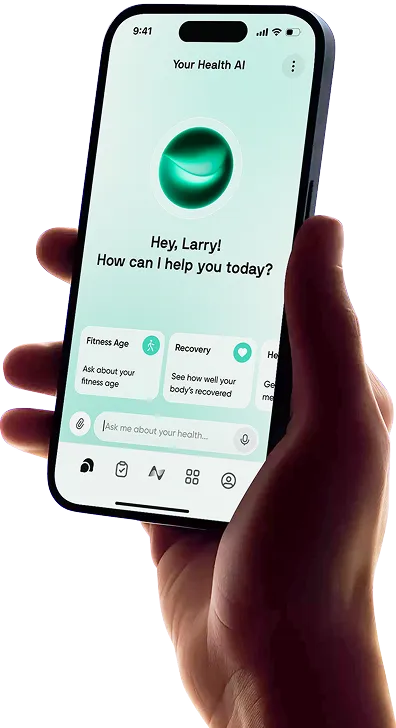
Google Health Connect promises to make your health apps work better together. Your watch’s activity records, the meals you log and information from other compatible apps can become useful beyond the app that first collected them.
In practice, user reviews show how frustrating that promise can be when records go missing or appear twice. This Health Connect review explains what the app actually does, which complaints deserve attention, and when Neura or another connected app could give you a more useful view of your health.
What Is Google Health Connect?

Google Health Connect is an Android service that stores supported health information and lets apps share it with your permission. Its main job is to help information travel between the services you use.
That could mean making activity recorded by a wearable available to another app, or letting a food diary contribute nutrition information to your wider health tracking.
Detail | What to know |
Cost | Health Connect itself is free |
Platform | Android; built into Android 14 and later |
Main purpose | Sharing supported information and managing app access |
Common data categories | Activity, sleep, heart rate, body measurements and nutrition |
Best fit | People using several compatible health and fitness apps |
A Shared Home for Compatible Health Data
Each connected app can request access to particular categories. You might allow one app to supply weight records and another to use them, without giving either access to everything else.
Health Connect also lets you inspect stored records and review which apps have accessed information. This is useful when you want to check where a number came from or remove access for an app you stopped using.
The information available depends on what the connected apps support. Installing Health Connect does not automatically make every app on your phone exchange every metric.
Health Connect vs Google Health vs Google Fit
The names are easy to confuse, especially if you previously used Fitbit.
Product | Its role |
Health Connect | Android’s shared health data and permissions service |
Google Health | The consumer app formerly called Fitbit, with tracking, summaries and optional paid features |
Google Fit | A separate activity-tracking app |
Google Health is somewhere you might open a dashboard and review your progress. Health Connect handles the sharing that can supply information to that experience.
A Google Health Premium subscription is therefore a separate purchase from using the free Health Connect app.


How Does the Health Connect App Work on Android?

Consider a night’s sleep recorded by a wearable. The wearable first sends its information to its companion app. That app can write a sleep record to Health Connect, where another permitted app can read it.
Both ends of that connection matter. The first app needs to supply the record, and the second needs permission and support to use it.
Where to Find Health Connect
On Android 14 and later, Health Connect is integrated into the operating system. Search for “Health Connect” in your phone’s Settings. Google’s standard route is Settings → Security and privacy → Privacy controls → Health Connect, although menu names vary.
On Android 9–13, you install the standalone app from Google Play. You can then access it through the phone’s app settings.
A conventional home-screen icon may be absent. Google’s Health Connect setup instructions explain the different access routes.
Connect Your Apps and Choose What They Share
For a useful first setup, choose one connection you actually want, such as sharing workouts or weight.
Check the data type. Confirm that the apps support the information you want to move.
Start the connection in the relevant app. Some apps require you to enable Health Connect in their own settings.
Allow the source app to write. “Write” means supplying information to Health Connect.
Allow the receiving app to read. “Read” means accessing the information already stored there.
Check one recent record. Look for it in Health Connect, then in the receiving app.
Historical information and background access can need additional permissions and app support. A new connection may not bring your entire history across automatically, so check those options if older records are missing.
What Can You Actually See?
Health Connect lets you browse data categories, inspect entries and review recent app access. Those controls help answer practical questions such as whether yesterday’s workout arrived.
It also supports phone step tracking on updated Android 14+ devices. Your phone can contribute steps alongside other sources, with controls for managing that contribution. Google’s step-tracking guide explains how to find and turn off phone-recorded steps.
These features give you access to the underlying information. Apps with dashboards, summaries or coaching build a different experience around it.
Where Your Information Goes
Health Connect stores its records on your phone. An app you allow to read them may keep its own copy under its own policies, so removing a permission does not necessarily remove information already copied elsewhere.
On Android 14 and later, scheduled exports can save supported data to a chosen cloud provider for later import. Google’s backup and restore instructions are worth checking before changing phones.
Health Connect Review: What Users Like and What Frustrates Them

The Google Play reviews reveal a gap between the appeal of connected information and the effort some people spend trying to make it work.
Our assessment is that Health Connect offers useful sharing controls, but discoverability and troubleshooting make its benefits harder to appreciate when something goes wrong.
What Users Like About Health Connect
Positive feedback highlights convenient sharing and having access controls together. One reviewer describes using information across Zepp, Withings and MyNetDiary; another praises the ability to manage which apps can access records.
That is the everyday benefit worth aiming for: information you already recorded becomes useful elsewhere, with less repeated logging. Being able to review an old app’s permissions is valuable, too.
Missing Data Makes the Whole Setup Feel Unreliable
Complaints include records arriving late or failing to appear. One November 2025 review describes sleep-sync trouble around time changes, while other feedback reports missing activity information.
For someone who bought a wearable to simplify tracking, spending an evening investigating an empty dashboard is a reasonable source of frustration.
A useful way to narrow the problem is to follow one record through the connection:
Is it present in the original app?
Has that app written it to Health Connect?
Can the receiving app read the relevant category?
Has the receiving app refreshed or completed its sync?
Google’s troubleshooting guidance identifies permissions, unsupported data types and connections that have not started correctly as possible causes.
This sequence helps establish where the transfer stopped. It cannot identify every cause, but it is more informative than repeatedly reconnecting everything.
Duplicate Records Make Useful Numbers Harder to Trust
A July 2026 review describes duplicated food and activity entries. Other feedback mentions inflated step counts.
The practical problem is that a successful-looking connection can leave you questioning the result. If two apps report different totals, you need to understand their sources before using either to judge your progress.
Health Connect lets you manage source priority for overlapping information. However, receiving apps may use Health Connect’s merged data or perform their own calculations. The same underlying records can therefore lead to different totals.
For steps, inspect the contributing sources and priority settings. For duplicated food or workout entries, check which apps are supplying those records and whether another direct connection is also involved. Avoid assuming that one priority change will solve every kind of duplication.
Finding the Controls Takes Too Much Effort
Several reviewers struggle to locate Health Connect after installation or expect a normal app icon.
The Settings-based access is documented, but that does not make the confusion trivial. If an app asks you to enable Health Connect, you should be able to find its controls again without searching the Play Store.
The service would be easier to understand with clearer signposting and explanations of what has arrived, what is still missing and which app needs attention.
Which Criticisms Need More Context?
Some feedback describes features belonging to another product. One five-star review praises a premium AI coach, which Health Connect does not offer. Battery-drain complaints also appear, but the reports alone do not establish which component caused the drain.
Similarly, Health Connect does have screens for records and permissions, even though it lacks the consumer dashboard some people expect.
The verdict: Health Connect is worth using for the connections your chosen apps need. Its weakest point is helping an ordinary user understand and resolve a failed connection. Once your information is arriving correctly, a dashboard or planning app can make it more useful day to day.
The Best Health Connect Alternatives for Deeper Insights

The best Health Connect alternative depends on what you want to improve. A clearer dashboard, a personal plan and a different transfer route solve different problems.
Several options below work alongside Health Connect. You can keep the sharing service and choose a better place to use the information it supplies.
Neura: For Connected Health Data and a Personal Daily Plan
Neura’s Health Connect integration brings supported shared information into a broader Health Profile, alongside goals, routines, self-reported context and other connected sources.
That is useful when your question goes beyond checking a number. You may already know how many steps you took or how long you slept. What you want is a routine that fits your schedule and helps you become more consistent.
For example, someone trying to exercise regularly could bring available activity and sleep information into Neura, then add their goals and the time they realistically have during the week. Those inputs provide context for a personal plan.
Neura’s health plans organize goals into daily actions, while the Neura Agent provides a place to discuss progress and changes in your routine. The appeal is having connected information contribute to what you do next.
This makes Neura a strong option for readers who want their health tracking to support a wider routine across exercise, sleep, nutrition and other goals.
Neura currently offers beta access. It also depends on the information available to it: if a sleep record never reaches Health Connect, Neura cannot use that missing record through this connection.
Choose Neura if: Your apps already collect useful information, but you want more help bringing it into an achievable daily plan.
Samsung Health: For a Familiar Everyday Dashboard
Samsung Health is a sensible starting point if you already use Galaxy devices and want to review activity, sleep and other wellness information in a familiar app.
Its value is the everyday viewing experience. You can check progress, revisit recent activity and use the features available for your device without adding another service immediately.
Samsung documents its Health Connect integration, including how Galaxy Watch information reaches Health Connect through the Samsung Health phone app.
Some insights require compatible hardware, and the available features depend on your setup. Start by seeing what your existing devices already provide.
Choose Samsung Health if: You want a dashboard centered on the Galaxy equipment you already own.
Google Health: For Fitbit and Pixel Users
The Google Health app, formerly Fitbit, offers a consumer-facing place to review tracking information and summaries.
Google’s integration guidance explains how it reads and writes supported information through Health Connect. You can review relevant metrics, inspect their sources and manage the connection.
It is a logical option for someone already using Fitbit or Pixel tracking who wants to keep that information together. Optional Premium features add another decision, covered in our Google Health Premium vs Free guide.
Remember that this viewing experience can still depend on the same Health Connect connection. Changing the dashboard will not necessarily resolve a record that never arrived.
Choose Google Health if: You prefer to keep your Fitbit or Pixel tracking and summaries within Google’s consumer app.
Health Sync: For a Transfer Route Health Connect Doesn’t Cover
Health Sync is relevant when the immediate problem is moving information between particular services.
It supports a range of sources and destinations, with options such as configurable historical syncing. The supported direction and data types matter, so investigate the exact route you need.
Health Sync offers a one-week trial followed by paid licensing options. Some integrations have additional charges, and historical syncing has licensing requirements.
Choose Health Sync if: You need a specific supported transfer route or more control over historical syncing.
Which Option Fits Your Situation?
Your priority | Option to consider |
Control sharing between compatible Android apps | |
Use connected information in a personalized daily plan | |
Review activity and sleep within the Galaxy ecosystem | |
Keep Fitbit or Pixel tracking and summaries together | |
Move information along a particular supported route |
Final Thoughts: Is Health Connect Worth Using?
Health Connect earns its place when it helps the apps you already use share useful information. Start with one connection you need and check that the relevant records reach their destination.
From there, choose the experience you want to open each day: a familiar dashboard, more control over a transfer route or a personal plan built around your goals.
For readers whose information is already connected but still feels scattered, Neura offers a practical next step. The benefit is bringing that information into the routine you are trying to build.
Article FAQ
What Is Health Connect on Android?
Health Connect is an Android service for storing supported health information and sharing it between apps with your permission. It is integrated into Android 14 and later and available as a standalone app for Android 9–13.
How Does Health Connect Work?
One app writes information, such as a workout or sleep record, to Health Connect. Another app can read that information if it supports the data type and you grant access. You can manage permissions and inspect stored entries in Health Connect.
What Apps Work With Health Connect?
Examples include Samsung Health, Google Health, Neura, MyFitnessPal and Oura. Support differs by data type and direction, so confirm what each app can supply or use.
Is Google Health Connect Free?
Yes. Health Connect itself is free. Subscriptions for connected apps, including paid coaching or advanced dashboard features, are separate.
Why Is Health Connect Not Syncing My Data?
Possible causes include missing permissions, an unsupported data type, a connection that needs enabling in the source app or a receiving app that has not refreshed. Check one recent record in the original app, Health Connect and the destination app to see where the transfer stops.
What Is the Best Health Connect Alternative?
Neura is a strong option for connecting available information to a personalized daily plan. Samsung Health and Google Health suit ecosystem-based tracking, while Health Sync addresses particular transfer routes. The right choice may complement Health Connect rather than replace it.